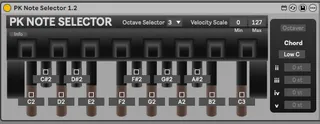
PK Note Selector
Modifies each pedal to output a selectable note and velocity...
- Type
- MIDI Effect
- Author
- karhakonhronon
- Version
- 1.2
- License
- AttributionNonCommercialShareAlike
- Live version
- 12.2.6
- Max version
- 9.0.7
- Downloads
- 133
- Updated
- 2025-11-21
PK Note Selector is a MIDI Effect for Ableton Live by karhakonhronon, distributed as Creative Commons Attribution-NonCommercial-ShareAlike. It targets Live 12.2.6 and Max 9.0.7. On maxforlive.com it has 133 downloads. First published 2022-04-08, last updated 2025-11-21.
New to Max for Live? Read what MIDI Effects do, what the AttributionNonCommercialShareAlike license means, how to install a device.
Description
Modifies each pedal to output a selectable note and velocity scaler.
Setup:
Select the octave from the dropdown menu that corresponds to the one selected on the PK Dynamic MIDI Pedal.
Choose a minimum and maximum for the velocity scale.
Assign each pedal a note from C-2 to G8.
All parameters are mappable.
Notes can be assigned by manually entering a note as a number (i.e 60), alphanumerically (i.e. C3), dragging the mouse, using automation, or toggling the learn button above the note box and sending MIDI to the device.
Version 1.2: Octaver and Chord functions.
Octaver function works the same way it does natively on the PK; adds a note an octave above unlesss the added note would be above G8, in which case it will add a note an octave below. The Octaver function happens after the Chord.
Chord function works by adding up to 4 additional notes to the corresponding pedal note played. Each pedal can be selected and assigned its own chord voice. Notes can be -48 to +48 semitones from the root note.