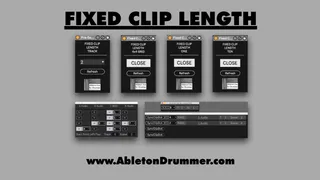
Set Fixed Clip Length for Recording
Get the devices and more info here: https://blog.abletondrum...
- Type
- Audio Effect
- Author
- AbletonKurse
- Version
- 1.0
- License
- Commercial
- Live version
- 11.1
- Max version
- 8.2.2
- Downloads
- 0
- Updated
- 2022-05-26
Set Fixed Clip Length for Recording is an Audio Effect for Ableton Live by AbletonKurse, distributed as a commercial (paid) device. It targets Live 11.1 and Max 8.2.2. First published 2022-04-25, last updated 2022-05-26.
New to Max for Live? Read what Audio Effects do, what the Commercial license means, how to install a device.
Description
Get the devices and more info here: https://blog.abletondrummer.com/how-to-set-fixed-clip-length-in-ableton-live/
When using Ableton Live’s Session View and recording clips for live looping you want to be able to set a fixed clip length in Ableton and not have to press a second time on the currently recording clip. Set a predetermined clip length in Ableton without using a Push is now possible via my Max for Live devices.
Individual vs. Global Fixed Clip Length in Ableton Live
You are able to record audio with quantised clip length when using an Ableton PUSH. Unfortunately you are only able to set a global clip length value here. This means EVERY live recorded audio or MIDI clip in Ableton Live’s Session View will be set to a preset value of X beats or bars.
With the my Fixed Clip Length Max for Live devices you are able to set length of x bars for each MIDI or audio track individually. You can predetermine clip length recordings for Ableton Live’s clip slots individually as well. This gives you full flexibility and control and you can focus on performing and making music.
Note: Ableton Live’s Transport needs to be running before you trigger/record a clip.
----------------------------------
Check out more Max for Live devices here:
https://maxforlivedevices.com/
All Devices - https://maxforlivedevices.com/category/all-devices/
Collections - https://maxforlivedevices.com/category/collections/
Control - https://maxforlivedevices.com/category/control/
Free - https://maxforlivedevices.com/category/free-max-for-live/
Hardware - https://maxforlivedevices.com/category/hardware-control/
How To and FAQ - https://maxforlivedevices.com/category/faq/
MIDI Tools - https://maxforlivedevices.com/category/midi-tools/
Max for Live not only for drummers:
https://blog.abletondrummer.com/free-max-for-live-devices/
How to install Max for Live devices:
https://blog.abletondrummer.com/how-to-install-max-for-live-devices-in-your-user-library/
List of best Max for Live for live music performance in 2022:
https://maxforlivedevices.com/best-max-for-live-devices-in-2022/
How to get Max for Live devices:
https://maxforlivedevices.com/how-to-get-max-for-live-devices/
Frequently Asked Question and How To Max for Live:
https://maxforlivedevices.com/category/faq/