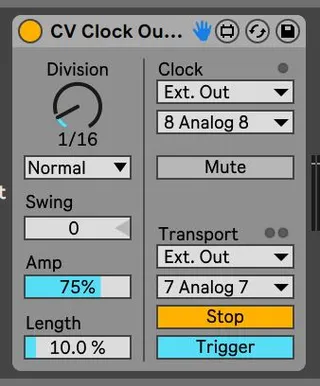
CV Clock Out with Stop Trigger for Reset Sync
This is the same as Ableton's CV Clock Out device, but with...
- Type
- Audio Effect
- Author
- d4vid
- Version
- 1.0.1
- License
- None
- Live version
- 10.1.18
- Max version
- 8.1.5
- Downloads
- 1,056
- Updated
- 2022-05-01
CV Clock Out with Stop Trigger for Reset Sync is an Audio Effect for Ableton Live by d4vid, distributed as freeware, with no license specified by the author. It targets Live 10.1.18 and Max 8.1.5. On maxforlive.com it has 1,056 downloads. Published 2022-05-01. 7 user comments below.
New to Max for Live? Read what Audio Effects do, how device licenses work, how to install a device.
Description
This is the same as Ableton's CV Clock Out device, but with an added Start/Stop toggle for the transport output that allows switching the trigger behaviour to trigger either when starting to play or when stopping Ableton Live.
This allows external Eurorack Modular hardware sequencers to actually be in sync with Ableton: Connect the transport's output to a sequence reset input on a modular device, and the clock connected to the module's clock, while having the newly added "Stop" setting activated. The device will send a reset trigger to the external module resetting it's sequence position and starting from the beginning next time when you start your transport in Ableton Live.
With the default Ableton CV Tools' CV Clock Out when the external hardware receives the reset trigger on start, then it will be out of sync with Ableton Live. If your clock is set to 1/16th, then the external sequencer will lag 1/16th. Sending the reset trigger on stop prevents this problem.
When the "Stop" setting is activated, the device will only send a simple trigger, disregarding the Gate/Trigger settings on the CV Clock Out module. Those settings only apply to the "Start" trigger. This could be improved in a future release, the current version was tested to work well with the Vpme Euclidean Circles v2 as demonstrated on the youtube link.
Changelog:
v1.0.1
- Recreated the device and have freezed the max patch before saving to make sure that live dependencies like the audio output selector bpatcher is saved into the patch.
v1.0
- Initial release.
Comments (7)
Maybee you can combine it with the Dfam Reset Device this would be awesome!!
many thanks