- Type
- MIDI Effect
- Author
- robotlovesyou
- Version
- 0.0.1
- License
- AttributionShareAlike
- Live version
- 11.1.6
- Max version
- 8.2.2
- Downloads
- 344
- Updated
- No Updates
CC Tool is a MIDI Effect for Ableton Live by robotlovesyou, distributed as Creative Commons Attribution-ShareAlike. It targets Live 11.1.6 and Max 8.2.2. On maxforlive.com it has 344 downloads. Published 2022-09-07. 1 user comment below.
New to Max for Live? Read what MIDI Effects do, what the AttributionShareAlike license means, how to install a device.
Description
CC Tool is a Max For Live MIDI effect which allows MIDI CC values to be set and automated from the arrangement view (live only has native support for setting these values from midi clips)
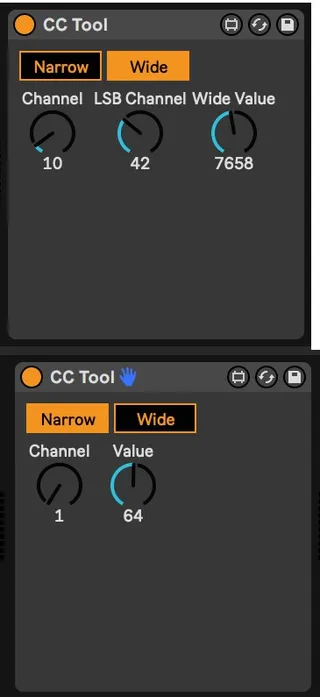
The tool has two views, narrow and wide.
In narrow view, the range of the value dial is 0-127. MIDI CC messages will be sent to the selected channel
In wide view, the range of the value dial is 0-16383. MIDI CC messages for the MSB will be sent to the channel selected with the Channel dial while CC messages for the LSB will be sent to the channel selected with the LSB Channel dial.
When the tool is in narrow view, input to the Wide Value dial will be ignored. Conversely when the tool is in wide view, input to the Value dial will be ignored.
The tool will pass through any MIDI CC messages to channels other than those it is configured to use, so multiple instances of the tool can be used to control multiple CC channels.
Incoming MIDI CC messages on the configured channel are ignored.
A demo project showing the device in use (with the device embedded in it) can be downloaded at the provided URL
Comments (1)
Also in Session View btw.