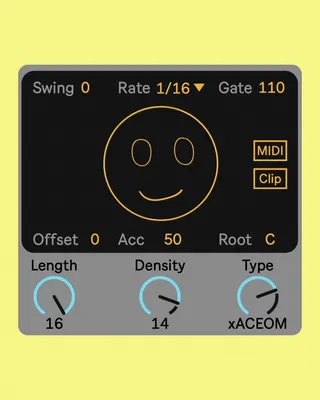
STING by IFTAH - Discontinued
This version of sting is discontinued and being replaced wit...
- Type
- MIDI Effect
- Author
- iftah
- Version
- 1.8
- License
- AttributionNonCommercialNoDerivatives
- Live version
- 11.1
- Max version
- 8.3
- Downloads
- 62,177
- Updated
- 2025-07-02
STING by IFTAH - Discontinued is a MIDI Effect for Ableton Live by iftah, distributed as Creative Commons Attribution-NonCommercial-NoDerivatives. It targets Live 11.1 and Max 8.3. On maxforlive.com it has 62,177 downloads. First published 2022-09-08, last updated 2025-07-02. 66 user comments below.
New to Max for Live? Read what MIDI Effects do, what the AttributionNonCommercialNoDerivatives license means, how to install a device.
Description
This version of sting is discontinued and being replaced with Sting 2, get it here https://maxforlive.com//library/device.php?id=12969
1.8 Update, fixed backwards compatibility
1.8 Update, fixed backwards compatibility with pre array max versions
1.7 update: fixed an issue where changing offset would affect multiple instances, improved density algorithm
1.6 update: added Push 3 support
1.51 update: fixed a bug where changing tracks will still generate midi clips on the previous track
1.5 update: added accent and clip generation.
clicking on "clip" will create a midi clip with the current sequence. this works in session mode only, also please note that this feature requires live 11.
1.04 update: minor bug fixes.
1.03 update: Generated pattern will now save with the set / preset.
i first came up with the idea for "sting" 10 years ago during a residency in reykjavik. it started like half a joke as in "can i program something that can generate acid lines" and turned out to be a great musical tool and super popular device. since then it saw several iterations that were made public, except of this last and concluding version which i was using on stage during the final years of skinnerbox.
"sting 2022" allows you to generate anything from atonal to acid lines and fluidly morph between them. you can also transpose the root note via midi, offset the sequence and do other neat things.
click on the smily face to generate a new sequence, use the “Density” dial to morph between 16 variations of the sequence, use the “Type” dial to morph between 16 tonal and a-tonal versions of the sequence, use the “Root” parameter to define the root of the scale or toggle “Midi” to define the root with incoming midi notes.
demo video here:
https://www.instagram.com/p/CiPqk9EtfJ_/
Comments (66)
I love seeing life in the original idea still.
Thanks!
Thanks for sharing!!!
save the generated line with the project (pretty sure its an easy adjustment most of us did with the originals..i recall something inside just had to be set to automate or something)
maybe some cute stuff like generate a note staff hehe
but in the end it was simpler to just update the device than to eloquently phrase this so the latest version (1.03) saves with the set / device preset, just redownload to update
It does seem that they are presets or set patterns in the background and not just random because I was able to find the exact pattern. Keep in mind I had remembered the parameters exactly as it was, but just had to keep clicking the face until I heard the pattern.
(here is a nice article about randomness in max if you are interested https://dobrian.github.io/cmp/topics/intro-to-max-and-msp/3.Randomness-in-Max.html )
i guess you just got lucky :)
@tbf maybe sometimes in the future
This is by far the best and most inspiring asieed gen I have tried:-D Really good work IFTAH xD!!
Thanks a lot!
Some suggestions I had:
1. step length could be increased to 32 or 64 for writing longer arp patterns.
2. an alternate button which could provide variations of the current pattern.
3. The midi follow feature is incredible! Would love a device with it for harmonic chord sequences.
Cheers!
Using Ableton Live 11 Lite (11.2.11 2023-03-17)
also would be great to have the button to create a clip exposed. Super handy.
As for the missing generate button - I ended up embedding the happy face button patch and freezing, maybe was an issue on my end but that worked.
the clip saving, whew that seems unsupported or needs to be done in some other way on p3 standalone.
Push standalone lets you work on a liveset with loaded in devices, but upon saving the set it will collect all and save and this causes Sting to get reinitialized and regenerate the notes. So better record those midi notes, or first add Sting, then save, and then jam.
or youll lose your line after the first save
after the project director and .als is created and sting is copied over to the folder tho, everything saves as expected and doesnt get reset either.
still hoping to figure out what to do about clip generation
"This device is not available for this version of Live"
Please help!
Thanks for that!
This is it.
IDEA: I'd LOVE the ability to record the pattern outputs to the arrangement view when recording! That way I could be playing the track and hit the smiley button and it would record the output while in arrangement view!!
(If it can do this already, could someone show me how?)
Thanks! This thing is AMAZING
Whenever I click on the face it stops working :(
Running Ableton 11.3.35
I've been a happy user of Sting since the first version and it has become an essential part of my music making process.
I recently bought a Push 3, but I can't get Sting to work.
Can someone help me install Sting on the Push 3 standalone?
I have to go back to Ableton just to push this button across several tracks after generating everything else on the Push.
maybe i miss something but i can just control accent and gate from Push 3 standalone version