Arrangement Loop Control
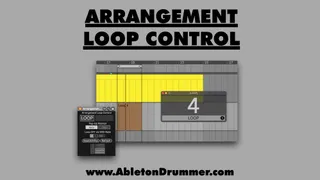
This Max for Live device lets you set up multiple loop regio...
- Type
- MIDI Effect
- Author
- AbletonKurse
- Version
- 1.0
- License
- Commercial
- Live version
- 11.1
- Max version
- 8.2.2
- Downloads
- 0
- Updated
- No Updates
Arrangement Loop Control is a MIDI Effect for Ableton Live by AbletonKurse, distributed as a commercial (paid) device. It targets Live 11.1 and Max 8.2.2. Published 2022-09-14.
New to Max for Live? Read what MIDI Effects do, what the Commercial license means, how to install a device.
Description
This Max for Live device lets you set up multiple loop regions in Ableton Live's Arrangement quick and easy. You just need to add MIDI clips for each area which you want to be set to loop automatically.
You can as well determine how many times this area should be looped before the transport keeps on playing to the next part by simply naming the MIDI clips.
Max for Live devices, online teaching and courses for Ableton Live. Get in touch for quotes.
https://blog.abletondrummer.com/free-max-for-live-devices/
https://www.abletondrummer.com
----------------------------------
Check out more Max for Live devices here:
All Devices - https://maxforlivedevices.com/category/all-devices/
Collections - https://maxforlivedevices.com/category/collections/
Control - https://maxforlivedevices.com/category/control/
Free - https://maxforlivedevices.com/category/free-max-for-live/
Hardware - https://maxforlivedevices.com/category/hardware-control/
How To and FAQ - https://maxforlivedevices.com/category/faq/
MIDI Tools - https://maxforlivedevices.com/category/midi-tools/
Max for Live not only for drummers:
https://blog.abletondrummer.com/free-max-for-live-devices/
How to install Max for Live devices:
https://blog.abletondrummer.com/how-to-install-max-for-live-devices-in-your-user-library/
List of best Max for Live for live music performance in 2022:
https://maxforlivedevices.com/best-max-for-live-devices-in-2022/
How to get Max for Live devices:
https://maxforlivedevices.com/how-to-get-max-for-live-devices/
Frequently Asked Question and How To Max for Live:
https://maxforlivedevices.com/category/faq/