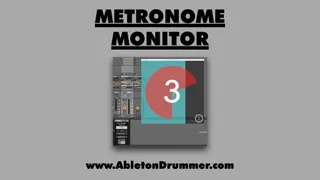
Visual Metronome Monitor Pop-Up Window
This Max for Live device lets you set up a big (or small) mo...
- Type
- MIDI Effect
- Author
- AbletonKurse
- Version
- 1.0
- License
- Commercial
- Live version
- 10.1.18
- Max version
- 8.1.5
- Downloads
- 0
- Updated
- No Updates
Visual Metronome Monitor Pop-Up Window is a MIDI Effect for Ableton Live by AbletonKurse, distributed as a commercial (paid) device. It targets Live 10.1.18 and Max 8.1.5. Published 2022-09-14. 2 user comments below.
New to Max for Live? Read what MIDI Effects do, what the Commercial license means, how to install a device.
Description
This Max for Live device lets you set up a big (or small) monitor pop up window for your metronome.
You can customise colours, slides, circles and flashing in beats.
Please watch the tutorial here:
https://abletonkurse.gumroad.com/l/Metronome_Monitor_Pop-Up_Ableton_Live
—————————————————
Max for Live devices, online teaching and courses for Ableton Live. Get in touch for quotes.
https://blog.abletondrummer.com/free-max-for-live-devices/
https://www.abletondrummer.com
----------------------------------
Check out more Max for Live devices here:
All Devices - https://maxforlivedevices.com/category/all-devices/
Collections - https://maxforlivedevices.com/category/collections/
Control - https://maxforlivedevices.com/category/control/
Free - https://maxforlivedevices.com/category/free-max-for-live/
Hardware - https://maxforlivedevices.com/category/hardware-control/
How To and FAQ - https://maxforlivedevices.com/category/faq/
MIDI Tools - https://maxforlivedevices.com/category/midi-tools/
Max for Live not only for drummers:
https://blog.abletondrummer.com/free-max-for-live-devices/
How to install Max for Live devices:
https://blog.abletondrummer.com/how-to-install-max-for-live-devices-in-your-user-library/
List of best Max for Live for live music performance in 2022:
https://maxforlivedevices.com/best-max-for-live-devices-in-2022/
How to get Max for Live devices:
https://maxforlivedevices.com/how-to-get-max-for-live-devices/
Frequently Asked Question and How To Max for Live:
https://maxforlivedevices.com/category/faq/
Comments (2)