Text Notes with Multiple Rows for Session View
This Max for Live device lets you set up and add text notes ...
- Type
- MIDI Effect
- Author
- AbletonKurse
- Version
- 1.0
- License
- Commercial
- Live version
- 11.1
- Max version
- 8.2.2
- Downloads
- 0
- Updated
- No Updates
Text Notes with Multiple Rows for Session View is a MIDI Effect for Ableton Live by AbletonKurse, distributed as a commercial (paid) device. It targets Live 11.1 and Max 8.2.2. Published 2022-09-14.
New to Max for Live? Read what MIDI Effects do, what the Commercial license means, how to install a device.
Description
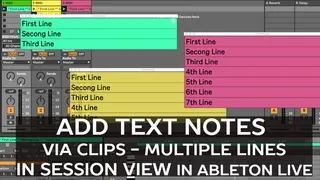
This Max for Live device lets you set up and add text notes with multiple lines to Ableton Live's Session View via a pop-up window.
Text input will work via creating and re-naming MIDI clips.
This text will be automatically displayed when the MIDI clip is playing.
The color of the clip can be used to set and change the background color automatically
You can select between 3 devices which will display 3, 5 or 7 lines.
Get it here: https://abletonkurse.gumroad.com/l/Notes-for-Ableton-Live
--------------------------------
—————————————————
Max for Live devices, online teaching and courses for Ableton Live. Get in touch for quotes.
https://blog.abletondrummer.com/free-max-for-live-devices/
https://www.abletondrummer.com
----------------------------------
Check out more Max for Live devices here:
All Devices - https://maxforlivedevices.com/category/all-devices/
Collections - https://maxforlivedevices.com/category/collections/
Control - https://maxforlivedevices.com/category/control/
Free - https://maxforlivedevices.com/category/free-max-for-live/
Hardware - https://maxforlivedevices.com/category/hardware-control/
How To and FAQ - https://maxforlivedevices.com/category/faq/
MIDI Tools - https://maxforlivedevices.com/category/midi-tools/
Max for Live not only for drummers:
https://blog.abletondrummer.com/free-max-for-live-devices/
How to install Max for Live devices:
https://blog.abletondrummer.com/how-to-install-max-for-live-devices-in-your-user-library/
List of best Max for Live for live music performance in 2022:
https://maxforlivedevices.com/best-max-for-live-devices-in-2022/
How to get Max for Live devices:
https://maxforlivedevices.com/how-to-get-max-for-live-devices/
Frequently Asked Question and How To Max for Live:
https://maxforlivedevices.com/category/faq/