- Type
- Audio Effect
- Author
- Oktagon
- Version
- 1.0
- License
- Attribution
- Live version
- 11.2
- Max version
- 8.3.3
- Downloads
- 290
- Updated
- No Updates
Clip Scroll is an Audio Effect for Ableton Live by Oktagon, distributed as Creative Commons Attribution. It targets Live 11.2 and Max 8.3.3. On maxforlive.com it has 290 downloads. Published 2022-11-27.
New to Max for Live? Read what Audio Effects do, what the Attribution license means, how to install a device.
Description
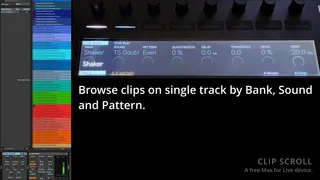
Clip Scroll is a device designed to allow easy browsing from Push of a track filled with audio loops. While the workflow is probably too specific to my setup to be useful as is, I think the technique used to do dynamic text parameters on the Push might be of interest, and it would be easy to remove/change the bits you don't want to use if you just like the browser itself.
The motivation for doing this is I wanted quick access in a live set to a curated list of loops, but also wanted to be able to use Ableton grooves. This ruled out the use of Simpler for example.
Please watch the linked youtube demo for a better idea of how it works.
Requirements to use the device:
- You need all of your loops as clips in a single audio track.
- Each clip must be named as bankname|soundname|patternname (with the pipe character as a separator).
- You cannot use any numerical characters!
- Clip Scroll should be the first device in the track, followed by Ableton Drum Buss (which will be automatically linked to Clip Scroll).
- The clips should all have the same groove applied from the groove pool (if you want to use the quantise feature).