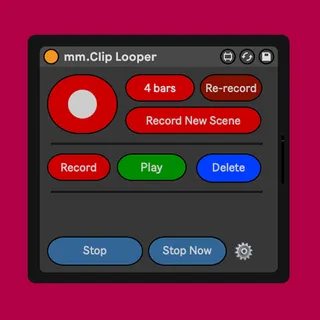
mm.Clip Looper
Turns a group of tracks into a clip based looper Feat...
- Type
- Audio Effect
- Author
- MessinkiMusic
- Version
- 2.1
- License
- Commercial
- Live version
- 10
- Max version
- 8.1.5
- Downloads
- 0
- Updated
- 2022-11-26
mm.Clip Looper is an Audio Effect for Ableton Live by MessinkiMusic, distributed as a commercial (paid) device. It targets Live 10 and Max 8.1.5. Published 2022-11-26. 3 user comments below.
New to Max for Live? Read what Audio Effects do, what the Commercial license means, how to install a device.
Description
Turns a group of tracks into a clip based looper
Features
Record clips into the selected scene, to easily create different sections of a song
If two or more loopers share the same input channel, only the selected looper will monitor incoming audio
(Live 11 only) Loop pedal style "late finish compensation" e.g when trying to record a 2 bar loop, if you end the recording at 2 bars and 1 beat, it will act as if you ended it at 2 bars.
Button to record for a predetermined amount of bars. (1-64)
Automatically names tracks in the group based on the group track
Use Live's native clip time stretching
Each clip can be a different length
2.1 UPDATE
Removed some unused code to make it compatible with Apple Silicon
Updated text in the preferences.
2.0 UPDATE
Rewrote the device
(Live 11 only) "late finish compensation" feature
1.2 UPDATE
Added auto naming feature
1.1 UPDATE
Fixed a problem that occured when recording or triggering loops in a new scene, loops in other scenes were not stopped
UPDATE
Added zipped project file to make things easier
Manual
Buttons
'Main' button acts like the multi button in Live’s looper effect. Press once to start recording a clip. Press again to end the clip, or double press to go straight into overdubbing. Pressing the main button again will start looping a new clip. Note that each clip can be a different length. If all clips in the group are stopped then the main button will trigger all clips to start playing
'Rerecord' will delete the most recently playing or recording clip and start recording a new clip in its place
'Delete' will delete the last playing or recording clip in the selected scene unless a clipslot is triggered (about to record), then it will untrigger that clip
'Stop' will stop all playing clips (quantised)
'Stop Now' will stop all playing clips (unquantised)
Usage
Clips will be recorded on the currently selected scene. To create a new set of loops simply select a new scene and press the 'Main' button. All playing and recording clips on any other layers will be stopped
Audio effects placed on the group track will be non destructive. This is useful if for things like recording a set of clips with a lowpass filter on the whole group, then after recording, raise the cutoff to reveal the unfiltered audio.
Audio effects placed on the 'In' track will be baked into the clips. this is useful for having different effects on each layer of the looper. You could record one clip with a lowpass on the 'In' track and another clip with a highpass.
Comments (3)
I am wondering how the Midi looper is going? I can help you test if you still need it.
Scott