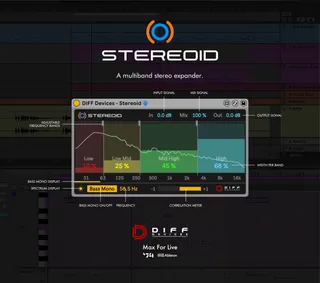
DIFF Devices - STEREOID
STEREOID is an impressive Max for Live device to precisely a...
- Type
- Audio Effect
- Author
- DiffDevices
- Version
- 1.0
- License
- Commercial
- Live version
- 11.2.7
- Max version
- 8.3.1
- Downloads
- 0
- Updated
- 2024-05-17
DIFF Devices - STEREOID is an Audio Effect for Ableton Live by DiffDevices, distributed as a commercial (paid) device. It targets Live 11.2.7 and Max 8.3.1. First published 2023-01-02, last updated 2024-05-17.
New to Max for Live? Read what Audio Effects do, what the Commercial license means, how to install a device.
Description
STEREOID is an impressive Max for Live device to precisely adjust stereo width on your tracks or your master.
FEATURES 1.0:
• Stereo Width per band ( 4 bands )
• Adjustable Frequency bands
• Bass Mono On/Off
• Spectrum display
• Correlation Meter
• Mix Signal
• GUI match Ableton Live Themes
INSTALATION & USAGE GUIDE
Inside the zip file you have an file :
1. DIFF Devices - Stereoid.amxd
2. Save the .amxd file anywhere on your computer or in a folder that you previously saved your maxforlive devices.
3. Drag and drop the device into a midi track.
4. Click on save (on the right hand side of the window: with a 'floppy disk' icon)... (Check Manual.)
5. This will automatically save the device to your ‘User Library’ folder in ‘Places’ (the ‘head outline’ icon), and will also save a '.adv' file which can be used to store your favourite initial setup.
6. Map “Open” button to your keyboard and/or midi controller.
7. You’re good to go.
SYSTEM REQUIREMENTS
• MAC & WIN
* Only works in Ableton Live with Max installed.
* It Requires Ableton Live V11 (minimum).
* M1 Mac Compatible.