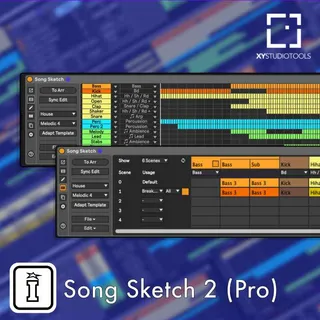
SONG SKETCH 2 - PRO PACK BY XY STUDIO TOOLS
A WORKFLOW TOOL THAT LETS YOU QUICKLY TURN YOUR SONG IDEA IN...
- Type
- MIDI Effect
- Author
- IsotonikStudios
- Version
- 1.0
- License
- Commercial
- Live version
- 10.1.18
- Max version
- 8.1.5
- Downloads
- 0
- Updated
- No Updates
SONG SKETCH 2 - PRO PACK BY XY STUDIO TOOLS is a MIDI Effect for Ableton Live by IsotonikStudios, distributed as a commercial (paid) device. It targets Live 10.1.18 and Max 8.1.5. Published 2023-01-14. 1 user comment below.
New to Max for Live? Read what MIDI Effects do, what the Commercial license means, how to install a device.
Description
A WORKFLOW TOOL THAT LETS YOU QUICKLY TURN YOUR SONG IDEA INTO A FULL ARRANGEMENT.
Song Sketch 2 is a Max for Live tool for working with song arrangement in Ableton Live. In Song Sketch 2, you can load, import, edit and create different arrangement patterns and apply them to your loops. In this way, you can quickly draft an arrangement, experiment with different options and evaluate arrangement ideas for the music that you are composing. The Pro edition includes a total of 172 arrangement templates in 14 genres. Song Sketch 2 is also available in a Starter edition (72 templates in 12 genres). More templates are available in expansion packs.
With Song Sketch 2 you can quickly draft an arrangement based on your loop and work with different arrangement options for the music that you are composing.
SONG SKETCH 2 – WORKFLOW
The Song Sketch workflow takes you from a loop to a full track in a few steps:
Start with your loop. Start with the loop that you are working on. You can use midi- and audio clips of different lengths. For each track or group of tracks, you can use either just one scene of clips or several different scenes.
Apply an arrangement pattern. Load a template with an arrangement pattern for the genre. You can either use preset templates in Song Sketch, or you can create your own templates. In Live 11, it is also possible to import the structure of an arrangement into Song Sketch.
Assign parts. When loading a template, your tracks will be matched with the different tracks in the template. Before placing the arrangement, consider how the tracks are assigned and make the adjustments that you like.
Define scenes. You now have a draft arrangement to start working from. If you are using several scenes, for example if you like to use a different chord progression in choruses, select in which section each scene should be used.
Play back the first draft. Click the “To Arr” button to place the arrangement onto the Live Arrangement View and play back to hear the first draft.
Edit. Edit the song structure in Song Sketch, for example by changing the length of sections, adding new sections, drawing bars and adding automation.
Play back and continue your workflow in the Arrangement View. Update the Live Arrangement View and listen to your result. You now have a starting point for a track and can continue your workflow in the Live Arrangement View, for example to work on layering sounds, creating variation throughout the track and adding automation.
SONG SKETCH 2 – KEY FEATURES
Grouped tracks: Assign a group of tracks in the Live set to one part in the arrangement template
Multiple scenes: Use several different scenes to create variation between song sections
Edit and create: Make settings for song sections, draw/edit your arrangement and save your own templates
Expanded view: Get more space to work in the pop out window
Drum rack tool: Auto separate drum racks to individual clips to enable arranging different drum parts
Import arrangements from Live: Import existing Live sets into Song Sketch (in Live 11)
SONG SKETCH 2 – ARRANGEMENT TEMPLATES
Song Sketch 2 Pro comes with 172 arrangement templates in 14 different genres and styles. Applying various arrangement templates enables you to quickly test your loops in a full length song.
You can also customise the arrangements, for instance by applying the pattern to your loops in different ways, or by editing the length and placement of the different parts of your song. Any work you do in Song Sketch can be saved as a new arrangement template. You can also create your own templates from scratch.
Templates included in Song Sketch 2 Pro:
12 x Hip Hop
12 x House (Chicago, Melodic, Tech House)
12 x Deep House
12 x Techno (Peak Time, Hypnotic/Deep)
12 x Dance & Mainstage
16 x Pop
12 x Drum & Bass
12 x Trap
12 x Reggae & Dancehall
12 x Trance
12 x Reggaeton
12 x Downtempo
12 x Disco
12 x Rock & Country
Comments (1)