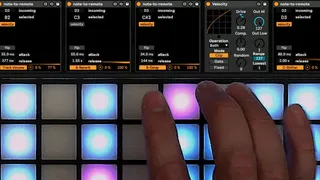
Note to Remote
This MIDI device takes MIDI notes and drives a remote parame...
- Type
- MIDI Effect
- Author
- langsound
- Version
- 1.0
- License
- AttributionShareAlike
- Live version
- 11.2.7
- Max version
- 8.3.1
- Downloads
- 362
- Updated
- 2023-01-17
Note to Remote is a MIDI Effect for Ableton Live by langsound, distributed as Creative Commons Attribution-ShareAlike. It targets Live 11.2.7 and Max 8.3.1. On maxforlive.com it has 362 downloads. First published 2023-01-16, last updated 2023-01-17. 6 user comments below.
New to Max for Live? Read what MIDI Effects do, what the AttributionShareAlike license means, how to install a device.
Description
This MIDI device takes MIDI notes and drives a remote parameter with the velocity (or on/off) state of the note. Rather than toggle a parameter on/off, this device lets note turn a device on while pressed and off when released (or vice versa)
The attack and release controls allow you to smooth the on/off envelope to avoid clicks.
The velocity button lets you use the key press velocity to scale the envelope. When velocity is turned off the envelope plays full scale.
The flip buttons lets you invert the key state, such that the key not pressed well output the envelop maximum and the key pressed will output the output minimum (scaled by the velocity). In flip mode, you can use this to duck the volume of a track for example.
All other MIDI data passes through this device, so you can have several on one track or in a drum rack.
Posting v 1.0 here for free. If you want to support further device development and tools, please check out the linked version.
fx automation via notes demo: https://youtu.be/S_W6ZYme73k
Comments (6)
I really like this device, it helps me a lot, but it only works, for a while and then does the above...
That's the only thing that bugs me is that i have to manually set the note to match the incoming one. It should be a learn function or just a range. Unless it is and i am using it wrong
Map it to momentary Mute Volumes.
Cut like a DJ