- Type
- MIDI Effect
- Author
- globalsettings
- Version
- 1.0
- License
- None
- Live version
- 11.2.6
- Max version
- 8.3.1
- Downloads
- 105
- Updated
- 2023-01-14
OTO BOUM is a MIDI Effect for Ableton Live by globalsettings, distributed as freeware, with no license specified by the author. It targets Live 11.2.6 and Max 8.3.1. On maxforlive.com it has 105 downloads. Published 2023-01-14. 1 user comment below.
New to Max for Live? Read what MIDI Effects do, how device licenses work, how to install a device.
Description
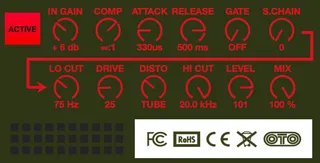
Intuitive layout for controlling the OTO BOUM; which corresponds to the signal flow of the device. I found this more useful than the given hardware control configuration. All settings are labeled for full visual representation and you can save presets in the plugin as well by shift+clicking a slot.
Comments (1)
And here is another situation I'm encountering: I have everything (all parameters on BOUM accesible via the device) automated in a midi clip, but when I fire the clip the BOUM is sometimes not responding to the change. Not always but sometimes. Can anybody help me out? Best, Tian