SCENE SETLIST by ABLETON DRUMMER
NAVIGATING AND MONITORING IN ABLETON LIVE'S SESSION VIEW MA...
- Type
- MIDI Effect
- Author
- IsotonikStudios
- Version
- 1.0
- License
- Commercial
- Live version
- 10.1.18
- Max version
- 8.1.5
- Downloads
- 0
- Updated
- No Updates
SCENE SETLIST by ABLETON DRUMMER is a MIDI Effect for Ableton Live by IsotonikStudios, distributed as a commercial (paid) device. It targets Live 10.1.18 and Max 8.1.5. Published 2023-01-20.
New to Max for Live? Read what MIDI Effects do, what the Commercial license means, how to install a device.
Description
NAVIGATING AND MONITORING IN ABLETON LIVE'S SESSION VIEW MADE EASY!
All (song) starting Scenes in one view and quick and easy to navigate through.
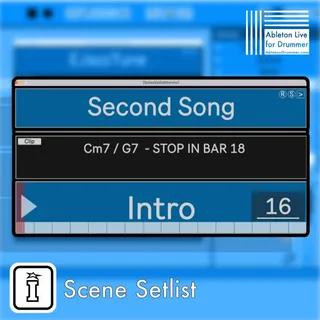
Count-down and visual-grid for current playing scenes is provided and lets you monitor change to next Scene, song or song-part. Set the display of the
“Scene Setlist Monitor” pop-up window in your desired size and customize colours and transparency.
Add custom text notes to be shown – chord charts, lyric key words or other important info can be quickly set up via MIDI clips.
iPad compatible version included which will display all infos on an iPad. (Requires iPad App “Mira”)
Perfect in combination with Scene Follow functions introduced in Ableton Live 11 to run full live shows in Ableton Live Session View.
Count-down and visual-grid for current playing scenes.
Perfect for combining with Scene Follow functions introduced in Ableton Live 11.