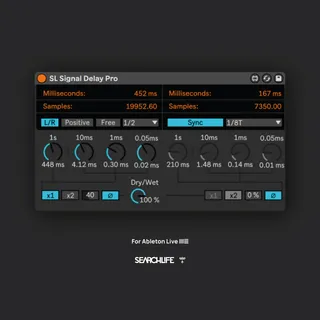
SL Signal Delay Pro
Hi! This Max for Live device is a signal delay intended to b...
- Type
- Audio Effect
- Author
- Searchlife
- Version
- 1.1
- License
- Commercial
- Live version
- 11.2.10
- Max version
- 8.1.5
- Downloads
- 0
- Updated
- 2023-03-16
SL Signal Delay Pro is an Audio Effect for Ableton Live by Searchlife, distributed as a commercial (paid) device. It targets Live 11.2.10 and Max 8.1.5. First published 2023-02-23, last updated 2023-03-16. 2 user comments below.
New to Max for Live? Read what Audio Effects do, what the Commercial license means, how to install a device.
Description
Hi! This Max for Live device is a signal delay intended to be used for phase and signal alignment.
Pro version - Features
- Positive delay: 4 knobs. One goes from 0ms to 1s and the others are for small adjustments (10ms, 1ms, and 0.05ms).
- Negative delay: Uses the same 4 knobs, but with negative values. Only one knob goes from 0ms to -1s and the other three knobs are for small adjustments (-10ms, -1ms, and -0.05ms).
IMPORTANT: "Delay Compensation" needs to be enabled in your DAW, otherwise it won't work. Note that using more "negative delay" means higher latency (with positive values, latency returns to 0 samples).
- Mono/Stereo button (stereo only with positive values). This means that you can have the same delay value for both channels, or different values on left and right channels.
- Feedback and Invert polarity button for each channel (depends on Mono/Stereo button).
- The value can be multiplied by 1 or 2 (only when using Free mode).
- Choose between Free or Sync modes to set the delay time.
- Dry/Wet knob.
- Delay time displayed in milliseconds and samples.
Short demo: https://www.youtube.com/watch?v=CozRhd2ev4A
Free version - Features
- 4 knobs. One goes from 0ms to 1s and the others are for small adjustments (10ms, 1ms, and 0.05ms).
- The value can be multiplied by 1 or 2 (only when using Free mode).
- Choose between Free or Sync modes to set the delay time.
- Invert polarity button.
- Dry/Wet knob.
- Delay time displayed in milliseconds and samples.
Free version:
https://maxforlive.com/library/device/8842/sl-signal-delay
v1.1
Minor UI fixes.
Comments (2)