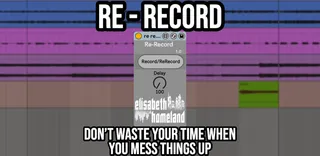
Re-Record
Re-Record is a small MaxForLive device that helps you move q...
- Type
- Audio Effect
- Author
- ElisabethHomeland
- Version
- 1.0
- License
- Commercial
- Live version
- 10.1.18
- Max version
- 8.1.5
- Downloads
- 0
- Updated
- 2025-01-01
Re-Record is an Audio Effect for Ableton Live by ElisabethHomeland, distributed as a commercial (paid) device. It targets Live 10.1.18 and Max 8.1.5. First published 2023-03-28, last updated 2025-01-01.
New to Max for Live? Read what Audio Effects do, what the Commercial license means, how to install a device.
Description
Re-Record is a small MaxForLive device that helps you move quicker during recording.
http://www.elisabethhomeland.com
When you key-map the original record button in live, if you mess things up and want to try again you need to do the following steps:
-stop the recording,
-delete the previously recorded messed up take,
-select the position where you want to start the new take,
-press the record button again.
But with re record this process is a lot quicker:
Map the Re-record button to a key.
When you press it the first time it'll start the recording, and if you know you want to start again, just press the keyboard shortcut again (to restart immediately) until you're happy with your performance ( then press space ):
If Count-in is enabled in your project Re-record will wait for the defined measure (like when you record normally with count in) , if it's not, you can define a delay value (in ms) before the next recording.