- Type
- Instrument
- Author
- steech
- Version
- 22.0
- License
- None
- Live version
- 11.2.11
- Max version
- 8.5.3
- Downloads
- 1,679
- Updated
- 2023-03-31
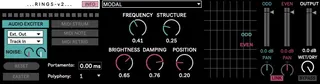
rings-v is an Instrument for Ableton Live by steech, distributed as freeware, with no license specified by the author. It targets Live 11.2.11 and Max 8.5.3. On maxforlive.com it has 1,679 downloads. Published 2023-03-31. 5 user comments below.
New to Max for Live? Read what Instruments do, how device licenses work, how to install a device.
Description
"...RINGS-v2..." by steech (v2.0)
original M4L device here: https://maxforlive.com/library/device/8111/rings
leaving the original in tact for the sake of compatibility
updates from v1:
- device is now an Instrument instead of an Audio Effect
- route audio in from other Live tracks or with the embedded Routing drop down
- "RESET" button only resets the rings Max object instead of all params & keeps resonator model # intact
Original code by Émilie Gillet
Max Object by Volker Böhm
FOR MAC & WIN (now with M1)
This uses Windows (untested) objects by:
https://ilovecubus.co.uk/pete/vb.mi_win64.zip
Basic Usage:
---------------------------------------------------------------------------------------------------------------------------------------------------------
STRUM
There are 2 "strum" modes:
1)
Audio routed to this Live track will hit, strike or caress the resonator. Send audio from another Live track to this device.
2)
Incoming MIDI will trigger a "strum".
When MIDI RETRIG is ON, every new MIDI note will trigger a "re-strum". When OFF, overlapping notes will cause a "re-strum".
---------------------------------------------------------------------------------------------------------------------------------------------------------
PITCH/FREQ (V/OCT)
There are 2 modes for controlling the Pitch/Frequency of the resonator:
1)
Incoming MIDI will set the pitch/frequency of the resonator.
2) FREQUENCY (knob)
Dial in Coarse Frequency of resonator between C0-C5.
---------------------------------------------------------------------------------------------------------------------------------------------------------
Comments (5)