- Type
- MIDI Effect
- Author
- ArnauBrichs
- Version
- 1.0
- License
- AttributionNoDerivatives
- Live version
- 10.1.18
- Max version
- 8.1.5
- Downloads
- 347
- Updated
- 2024-01-31
MapClipName is a MIDI Effect for Ableton Live by ArnauBrichs, distributed as Creative Commons Attribution-NoDerivatives. It targets Live 10.1.18 and Max 8.1.5. On maxforlive.com it has 347 downloads. First published 2023-04-01, last updated 2024-01-31. 1 user comment below.
New to Max for Live? Read what MIDI Effects do, what the AttributionNoDerivatives license means, how to install a device.
Description
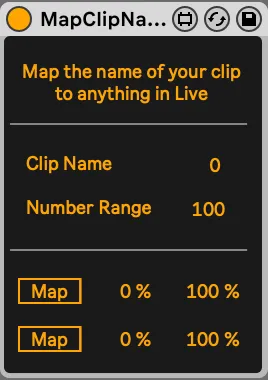
Name your midi clip as a number, and map that number to any parameter in Live.
QUICKSTART
You need to choose the right range of your input. For instance, if you have 10 scenes, and want each scene to map to its number, you need to specify a range of 10, and then it will map each exact scene number correctly (scene 1 to 1, scene 2 to 2, etc).
There's two identical buttons that can map to different destinations.
EXAMPLES
For instance, you could map the number to this preset recall device, to trigger different macro variations with interpolation: https://maxforlive.com/library/device/6767/smooth-automator
–––––––––––––––––––––
If you enjoy the device, please consider supporting its development here: https://www.paypal.com/donate/?hosted_button_id=EMY45K7MK3QB6
Comments (1)