PIASTRONE BY AVAL
MAXFORLIVE PLATE REVERB Piastrone is a Max4Live devic...
- Type
- Audio Effect
- Author
- IsotonikStudios
- Version
- 1.0
- License
- Commercial
- Live version
- 10.1.18
- Max version
- 8.1.5
- Downloads
- 0
- Updated
- No Updates
PIASTRONE BY AVAL is an Audio Effect for Ableton Live by IsotonikStudios, distributed as a commercial (paid) device. It targets Live 10.1.18 and Max 8.1.5. Published 2023-04-28. 1 user comment below.
New to Max for Live? Read what Audio Effects do, what the Commercial license means, how to install a device.
Description
MAXFORLIVE PLATE REVERB
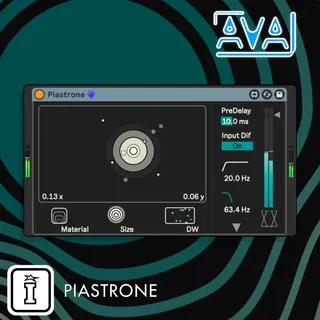
Piastrone is a Max4Live device for Ableton Live, a plate reverb dedicated to the italian composer Gino Marinuzzi Jr., who in 1963 defined with this term the reverb technique. It’s based on the famous Dattorro (1997) digital plate reverb design, which returns a dry and, at the same time, deep and spacious sound, with the possibility, through modulations, to obtain more metallic and spicy sound.
PIASTRONE CONTROLS
XY control panel: controls internal diffusing and filtering, centered it creates warm and
diffused signal, while to the sides it generates a sharp and bright sound. At the bottom
there are X and Y position values, mappable in order to make them move with external
LFOs or sequencers.
Material: controls the decay of the reverberation.
Size: changes the ‘plate size’ by expanding the delay lines.
DryWet: amount of dry or wet signal.
PreDelay: amount of delay before early reflection
Input Diffuse: enable/disable input diffusing, allowing to get softer transients when
enabled.
Highpass Filter: the white curve, a HPF that filters the input signal before the
reverberation.
Lowpass Filter: the green curve, a LPF that filters the input signal before the
reverberation
Down left arrow: opens a pup up menu where you can set the LFO mask of the diffusers,
from here you can change:
Rate: speeds up or stop the LFOs freq.
Depth: change the amount of modulation
Shape: dragging it you can change the Ifo shape, from a reverse saw to a ramp, a
triangle wave by default.
Comments (1)