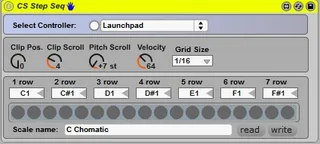
CS Step Seq Mod
The main idea for this device - is to edit currently selecte...
- Type
- MIDI Effect
- Author
- buba
- Version
- 2.0
- License
- None
- Live version
- 8.2.2
- Max version
- 5.1.8
- Downloads
- 1,344
- Updated
- 2011-11-04
CS Step Seq Mod is a MIDI Effect for Ableton Live by buba, distributed as freeware, with no license specified by the author. It targets Live 8.2.2 and Max 5.1.8. On maxforlive.com it has 1,344 downloads. First published 2011-09-25, last updated 2011-11-04. 16 user comments below.
New to Max for Live? Read what MIDI Effects do, how device licenses work, how to install a device.
Description
The main idea for this device - is to edit currently selected clip on launchpad.
To use this device you will need launcpad (no APC 40 support anymore).
1. Drop CS Step Seq on main.
3. Press user2 button on launchpad
2. From now any selected midi clip will be availible for editing on your control surface.
Use:
1. Page buttons on launchpad to scroll left/right in clip. Scroll amount set with "Clip Scroll"
2. Leran/view buttons on launchpad to scroll Up/Down in clip. Scroll amount set with "Pitch Scroll"
3. Press arm button on launchpad to update control surface with currently playing position
3. Right buttons on launchpad for velocity.
5. Bottom buttons on launchpad for duration/grid size. When Arm is light on you cant use bottom row. But when Arm is light off bottom row become like right buttons but for durations.
6. You can use any note for any row.
7. If you disable device it will no longer react to user2 button. This allows you to use more then one launchpad device.
You can change velocity and duration for any note by pressing on it and choose velocity with right buttons and duration with bottom buttons. If you dont choose velocity or duration, note will be added with default velocity and duration (wich you can change with right and bottom buttons)
Updated 04.11.2001 to version 2.0. Bunch of new features, i was test this about one month all work stable. I think that device become more and more complex but i dont wont to write description if no one need it except me. So if you like it or you need it write here
Comments (16)
Congratulations, simple, efficient and stable!
What i'm missing right now, so here my suggestions (only for launchpad):
- use right launchpad's button 1 to 5 (vol, pan, sndA, sndB, Stop) as velocity zone: 5 velocity fast access (divide 127 by 5 ), press one of these 5 and click on the grid to affect this velocity to the note edited. No press : assign the general velocity set with the normal velocity parameter.
-use button solo on the right side as a shift navigation button: press this button and one of the 4 arrow/nav buttons of the launch pad allows you to navigate by block of 8 instead of 1by 1.
- maybe you could use colors for velocity or pitch....
1. Right buttons for velocity (press note and when pressed change velocity). Just press and set general velocity.
2. Scroll behaviour (notes updates continiously every beat. just try)
3. Colors for velocity
Just fix some bugs and will update in 1 or two days. Good idea to use solo button for navigate of 8 beats! And good idea to discuss about which color to wich velocity. Because Launchpad have only 3 distingushed light
Am I the only one?
max releases/ But now i'am switch yo user1 mode for clip edit.
to uxeexu: i dont made any tutorial video before. so maybe this will be my first one ;)
suggestion: add color to button left and right of launchpad, same color for both , color change depending the page...can be useful to know where you are in the clip ...