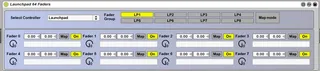
Launchpad 64 faders
This device will turn your launchpad to 64 faders, and allow...
- Type
- MIDI Effect
- Author
- buba
- Version
- 1.0
- License
- None
- Live version
- 8.2.2
- Max version
- 5.1.8
- Downloads
- 1,378
- Updated
- 2012-01-08
Launchpad 64 faders is a MIDI Effect for Ableton Live by buba, distributed as freeware, with no license specified by the author. It targets Live 8.2.2 and Max 5.1.8. On maxforlive.com it has 1,378 downloads. First published 2011-11-04, last updated 2012-01-08. 35 user comments below.
New to Max for Live? Read what MIDI Effects do, how device licenses work, how to install a device.
Description
This device will turn your launchpad to 64 faders, and allows you to map this faders to any parameter in Live. Drop it on any track and press User2 button.
1. Button Matrix used for 8 faders. First column is 1 fader. Second is 2 and so on
2. Right buttons used to change fader group (8 fader groups avalable) and to set precise fader value.
3. Map mode allows you to map any parameter in Live (all vst also supported) to fader. Just press learn button on launchpad to go to map mode. Now press on desired column on launchpad, then move parameter in Live. Viola - parameter mapped.
4. Press and hold down button matrix. Now you can use right buttons to set precise value.
5. If device is off it will not react to User2 button. This allows you to use this device with any other launchpad devices. More over - you can control as many parameters as you need, just use as many instances of this device as you need. But remember - only one can be active at same time.
If some one will need this i will explain in more detail.
updated 08/01/2012 - added glide function
Comments (35)
Just a idea... how would it be holding down USERMODE2 Button
-right buttons selects with colour change (we have 8 ) a new layer.
so we could manage 8x 64 Fader or somethin else..
really usefull
I've activated the mapping, with launchpad "learn" and with the max "map mode" buton, then selected the first fader, it changes to yellow, but then when I move parameters in live (volume, pan, mix, VST parameters with the "configure" option already done...) nothing appears to map.
1. drop device on any track
2. choose your launchpad as device
3. press user2 button
4. press learn button
5. press on any column and this column become yellow.
6. move any parameter in live with mouse - column become green, this is mean that parameter mapped
7. press learn button again to exit from map mode
i move parameter in live BEFORE enter learn mode - this guarantees that this parameter was last changed parameter in live. and exactly this parameter will be mapped. this is max for live behaviour
Everything is OK until the step 6, it doesn't become green, so, it doesn't maps, even if I change the parameter before, for the last changed parameter issue.
Do you know if the problem is that I'm using the Max demo version? Or maybe the MIDI configuration?
THANK YOU!
A few days ago, I borrowed my brother's launchpad and droped my APC40. Then I tried to use it as I wanted and so I founded your 64 faders devices. The same night, I bought my own Launchpad and sold my APC (true)... But now, I'm in a big trouble. Your amazing device isn't working anymore. I tried everything but still not working. I start Live then add this device, than my mbp harddrive starts going crazy to finally crash. The max editor won't open neither, or barely but impossible to process to anything except if I shut Live down. But still, impossible to save, ...
Man, this is driving me crazy ! Plz, do you have any ideas over How, Why ,...
I really need your device.
So give me a 2 days and i will record step by step instruction. BUT if this is happened - i think maybe you must clean reinstall operating system. This is VERY strange behaviour. Is this happend only with my device? Can you check out some other devices? So you only one who use this except me, and i promise to help you man ) Dont panick! ;)
http://cycling74.com/forums/topic.php?id=23052
I think I get the same problem. It's about the UMENU inside the patch which has been saved and then reopen with a different configuration of max, and different launchpad. I think that woudl be this. But How can I open this patch which is .amxd and not .maxpat as text?
I formatted my mbp, it's like new, not a single file, expect Live 8.3 and Max6. It is still not working. I opened the Max windows and did a screen print. I downloaded it on a email address I created for: [email protected] password: launchpad. The file is in a wetransfer mail waiting for you in the mailbox.
Thank you for everything.
Using your file would mean going back to device file or going for disk file ? What does that mean ? I did both but nothing changed ?
Anyway: I'm finally able to use it. WOW !!!! So nice !
What I did is downloaded max5 again and use it as my m4l runtime. Currently it's still in trial mode, but I know I can authorize it with my Max6 serial. I'll stay this way for a while.
But I don't like being obliged to use max5 to do so. Do you understand why ?
Next step: I would really love to learn more about max to be able to modify your patch. What I really want is a horizontal row in the bottom to use it as a crossfader with 8 verticals rows like it is now. Do you have any advices for me ? I know I'm asking a lot ! :D
Once again, I'm really grateful for what you did .
Benhu
1. files from device
2. max5
files from device mean that i'am modified original files that come wiht max and save int in my device. so you need to use it anyway (why i else modify them? ;) )
max5 is only enviroment that i'am use to build and test this device. i dont use max6 because i havent it.
To use it like crossfader you can simply map crossfader to one of the rows. But i dont understand what you realy want. If you need to change one row from vertical to horizontal this is too hard to programm. I thnik best way to do this - just use last vertical row for crossfade. Or you can buy another launchpad place it vertical and use like croddfader ;)
Happy tweaking!
help would be appreciated, thanks!
I use a Launchpad S and can´t change the banks.
Does anyone knows a solution?
Im use Ipad now to control software, its much much more useful. But this summer im remember this project. It only works for live 8 and max 5.
Maybe this will help?