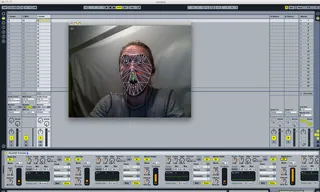
FaceOSC Mapper
This device allows you to take the messages from FaceOSC (of...
- Type
- MIDI Effect
- Author
- miketodd
- Version
- 1.0
- License
- None
- Live version
- 8.2.5
- Max version
- 5.1.8
- Downloads
- 6,272
- Updated
- 2011-10-14
FaceOSC Mapper is a MIDI Effect for Ableton Live by miketodd, distributed as freeware, with no license specified by the author. It targets Live 8.2.5 and Max 5.1.8. On maxforlive.com it has 6,272 downloads. First published 2011-10-10, last updated 2011-10-14. 11 user comments below.
New to Max for Live? Read what MIDI Effects do, how device licenses work, how to install a device.
Description
This device allows you to take the messages from FaceOSC (of facial movements and positions through a webcam) and map them to parameters within Live.
Note: I remapped the number ranges incoming from FaceOSC - if you have issues with the levels you may want to open it up and mess with them (the zmap objects).
Download FaceOSC here (os x binary - source also available on github I believe) - https://github.com/downloads/kylemcdonald/ofxFaceTracker/FaceOSC.zip
Thanks to Kyle McDonald for the FaceOSC code.
Mike Todd
vimeo.com/miketodd
Comments (11)
Greatest device ever.
Thanks a lot.
anything i need to do?
im using :live 8.2.5 and max 5.1.8 and v-modules if needs on i7(pc)
any tips ?
thanks.
Any advice ?
https://github.com/downloads/kylemcdonald/ofxFaceTracker/FaceOSC.zip
does FaceOSC 6 tracks.amxd also work under Windows 7?
Because I installed 1. FaceOsc and 2. your plug In for Ableton.
1. Do i need to install additionation Software?
2. Do I to change anything under Ableton your FaceOSC 6 tracks
aplication like Port number? Because facial expression from
me recognized from Face OSC has no effect in FaceOSC 6
tracks!
Please help I am a big Fan from Face OSC and need to try out without switching to Apple OS.
I'm using Ableton 9.1.4