Inspector
Inspired by the inspector panels of other DAWs the Audio Lor...
- Type
- MIDI Effect
- Author
- AudioLord
- Version
- 1.1
- License
- Commercial
- Live version
- 11.2.11
- Max version
- 8.3.3
- Downloads
- 0
- Updated
- 2023-05-16
Inspector is a MIDI Effect for Ableton Live by AudioLord, distributed as a commercial (paid) device. It targets Live 11.2.11 and Max 8.3.3. First published 2023-04-30, last updated 2023-05-16. 7 user comments below.
New to Max for Live? Read what MIDI Effects do, what the Commercial license means, how to install a device.
Description
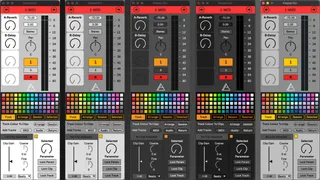
Inspired by the inspector panels of other DAWs the Audio Lord Inspector works on the currently selected track, clip or parameter and aims to bring all of the essential functions into one place.
The key features of the device are:
Control of the selected tracks volume, pan (stereo or split), sends, mute, solo and record arm. Change the name and colour of the track from the device.
Control of the selected clips gain, coarse and fine pitch and select the warp mode. Change the name and colour of the clip.
Control the currently selected parameter with a MIDI controller.
The track and all of its clips (session and arrangement) can be changed colour at the same time.
Add MIDI, audio and return tracks.
Most of the UI can be MIDI mapped allowing dynamic control of the selected track or clip without creating a custom MIDI controller script. This also makes it possible to add key commands to functions hidden in right click menus that have no keys assigned.
Updated to V1.1 with bug fixes and added new features requested by users.
For support, bug reporting, or feature/device requests email: [email protected]
Comments (7)
definitely worth the price
Thanks
This is definitely possible, I prefer getting a readout of the current values but I could make it so users can choose between current and max!
Thank you for purchasing Inspector and feel free to email with any other suggestions, I usually reply faster there.
James @AudioLord