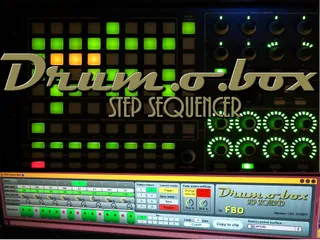
Drum-o-Box APC40 Step Sequencer
This Max For Live patch is a step sequencer inspired by the ...
- Type
- MIDI Effect
- Author
- Jaggfab
- Version
- 1.01
- License
- AttributionNonCommercialShareAlike
- Live version
- 8.2.6
- Max version
- 5.1.9
- Downloads
- 8,717
- Updated
- 2011-11-07
Drum-o-Box APC40 Step Sequencer is a MIDI Effect for Ableton Live by Jaggfab, distributed as Creative Commons Attribution-NonCommercial-ShareAlike. It targets Live 8.2.6 and Max 5.1.9. On maxforlive.com it has 8,717 downloads. First published 2011-10-30, last updated 2011-11-07. 13 user comments below.
New to Max for Live? Read what MIDI Effects do, what the AttributionNonCommercialShareAlike license means, how to install a device.
Description
This Max For Live patch is a step sequencer inspired by the sequencer part of some old school drum machines, but with some nice additions and usable with the Akai APC40 Ableton Live controller.
Some interesting features :
- Automatic toggle the APC40 from sequencer to session control modes.
- Very intuitive interface allows you to select/play/hear instruments, mute/unmute instruments, select bar, set loop lenght, program beats and velocity, select/play patterns, and more, right from your APC40.
- Patterns can be launched by MIDI (trigger mode, gate mode, sync to transport or free run)
- Easy copy patterns to MIDI clips
- Multiple configurable velocity states
- Patterns can have loop lenghts up to 8 bars
- Configurable MIDI output for each instrument/track
- Patterns are saved with Live project
Read full user guide here : https://docs.google.com/document/pub?id=1n8Aav-yOxR9TewQDpnraczFDUcL25BJ-padqax53coA
Youtube demonstration video : http://www.youtube.com/watch?v=umRcxumTAC8&hd=1
Please follow me on Twitter for updates and support : http://twitter.com/____FBO____
Comments (13)
Expect an update in some weeks... as soon as I'll have some time to do it ! :)
sunfalls.org
[email protected] (i could help test.humbly)
But adapting Drum-o-Box to be compatible with Novation Launchpad seems to be a little bit more complex than I initially thought.
Pads adressing and observing is quite similar. However, I will have to change a few things, such as patterns launch pads , which are now located in the matrix, while with the APC40 they are on the stop clip buttons. This should be done easyly.
The real problem is to control the LEDs colors, wich is totally different as on the APC40. I'm studying a way to implement "drivers" for pads colors for both APC40 and Launchpad without reducing performance of the whole pacth. But if I see that it will take me too long, I'll simply publish a "Launchpad Edition" version of my patch.
Stay tuned !
It is exactly what I have been hoping to find in order to be able to program beats while playing live directly on the APC!
I have a couple of suggestions for further development if you have plans for that:
- It would be the perfect drum sequencer if you add possibility to control swing amount in the sequencer.
- Also it would make it even more awesomely handy if the velocity toggle behavior could be changed / disabled, so that it would be possible to instantly remove a drum hit with one press..
These are just ideas - it's already a fantastic patch, thank you once again!
Jaggfab, you might want to check out DrumLauncher 0.2
It's a little basic in comparison to Drum-o-Box, but i find it pretty spot on as a 16-step sequencer for the Launchpad.
Although it's confined to only four notes, I like how it still leaves user 1 mode free for other stuff.
Also: +1 for adding some swing to Drum-o-Box. That would make it perfect.
Swing would be a really cool feature. I'll study how to implement it asap. The "clock" of the Drum-o-Box is the "Transportator" subpatch. Maybe I could change how the patch read the patterns and add a random +/- time offset on note play... I've to check that.
Changing the toggle behavior of the pads should also be possible.
Still trying to find the time to implement Launchpad full support, but I will not forget all these excellent suggestions.
Did this device stop working with live 9? I get lights on the APC40 which correspond to what I'm seeing in the sequencer (which stays consistent when I change values using the mouse) but pressing the buttons on the APC doesn't seem to register. Thoughts?
Thanks!
Do not want to work. No feed-back