- Type
- Audio Effect
- Author
- Arakidetenue
- Version
- 1.0.2
- License
- None
- Live version
- 12.1
- Max version
- 8.6.4
- Downloads
- 198
- Updated
- 2026-01-02
lex f is an Audio Effect for Ableton Live by Arakidetenue, distributed as freeware, with no license specified by the author. It targets Live 12.1 and Max 8.6.4. On maxforlive.com it has 198 downloads. First published 2023-10-21, last updated 2026-01-02.
New to Max for Live? Read what Audio Effects do, how device licenses work, how to install a device.
Description
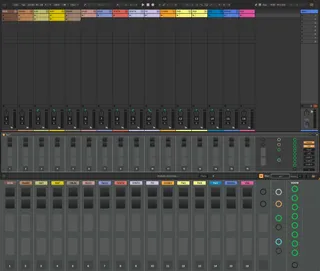
The beta interface of lex f.amxd allows to adjust parameter values of more than one track at once.ㅤㅤㅤㅤㅤㅤㅤㅤㅤㅤㅤㅤㅤㅤㅤㅤ
The same behavior is available by default within Ableton Live: Shift+click selects an entire continuous selection, Ctlr+click selects multiple individual Tracks or Clips.
Parameter names appear inside Info View while you hover the main panel.
Every parameter can be assigned to a hardware midi controller, values can be automated from either midi or audio Clips.
Sliders that are positioned in the lower area of the interface have already been configured in order to automatically control the first assignable parameter of the first device placed in their corresponding track number. Init button will reset all parameters at once.
A duplicate set of parameters resides in an optional extra window that will appear if remote button is on. The entire area of this floating panel can be moved to a secondary monitor: this version will fit on the smartscreen of a Zenbook laptop, you might consider to scale it by editing the presentation view of the original patch.
Short video tutorial:
https://youtu.be/PMHA2eD__U8
Simple demo video (v 1.0):
https://youtu.be/2sWnUhTyS0A
16 track demo project:
lex 1.0.1.amxd boddifoi.alp (Live 11) http://tiny.cc/4rmcvz
lex f 1.0.2.amxd boddifoi f.alp (Live 12) http://tiny.cc/mztqzz
Happy patching ツ