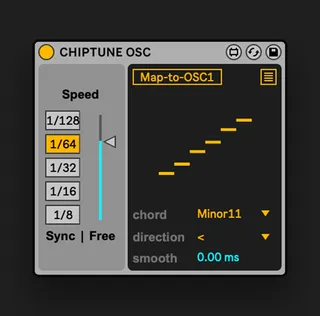
Chiptune OSC
Online Manual & Tutorial Videos: https://sidebrain.net/chipt...
- Type
- MIDI Effect
- Author
- OCH
- Version
- 1.0.4
- License
- Commercial
- Live version
- 11.3.13
- Max version
- 8.5.6
- Downloads
- 0
- Updated
- 2024-08-17
Chiptune OSC is a MIDI Effect for Ableton Live by OCH, distributed as a commercial (paid) device. It targets Live 11.3.13 and Max 8.5.6. First published 2023-11-18, last updated 2024-08-17.
New to Max for Live? Read what MIDI Effects do, what the Commercial license means, how to install a device.
Description
Online Manual & Tutorial Videos: https://sidebrain.net/chiptune-osc-for-ableton-live
OLD SCHOOL OSCILLATORS
Companion oscillator sequencer allows you to create old-school video games influenced fast chord arps and use them directly inside the synth Oscillator.
Turn Ableton Synths into Chiptune Synths
FEATURES:
- 4 Oscillators Mapping
- Free/Sync Time
- Smoothing Time Change
- 25 Chords and Note Clusters
- Multi-Direction Sequencer
- Compatible with the latest version Ableton Suite 11
- Tested in Ableton Live 12
CONTROLS:
- Rate Control - Change speed with Sync Buttons and freely at the same time
- Smooth Amount - Adjust the time it takes to reach the new selected speed
- Sequencer Direction - Change note run direction between: Forward, Backwards, Forward & Backwards
- Chords & Clusters - Choose between 25 chords & note clusters
- Make Your Own Chords - Use the note graph to change individual notes intervals from -3 to 21
- More Mapping - Map up to 4 Oscillators across different synths
COMPATIBILITY:
- Latest Version of Ableton Suite 11
- Additional testing was made in Ableton Live 12 beta
WORKS WITH:
- Wavetable
- Drift
- Meld (In key awareness)
- Granulator II
- Granulator III
- Bass
- Poli
INSTALLATION:
- After Download – Place the device under User Library/Presets/MIDI Effects/MIDI Effect Rack/Max MIDI Effect
**Latest Version of Ableton Suite 11 is required
Changelog:
1.0.4
- Minor visual updates
- Fixed added MPE pass through
1.0.2
- Update Fonts to Ableton Sans
- Fixed broken ‘fixspeed’ automation
- Fixed Parameters Names for Automation Lanee
1.0.0
- Official Release