och.smartlight
Control your TP-Link smart lights from Ableton. click...
- Type
- Audio Effect
- Author
- OCH
- Version
- 1.2
- License
- Commercial
- Live version
- 11.0.2
- Max version
- 8.1.11
- Downloads
- 0
- Updated
- 2021-04-19
och.smartlight is an Audio Effect for Ableton Live by OCH, distributed as a commercial (paid) device. It targets Live 11.0.2 and Max 8.1.11. First published 2020-11-22, last updated 2021-04-19.
New to Max for Live? Read what Audio Effects do, what the Commercial license means, how to install a device.
Description
Control your TP-Link smart lights from Ableton.
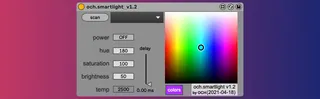
click "scan" to scan smart lights in your network, then select which one you want to control.
Change between white and color modes. Turn it on or off and control hue, saturation, brightness, and temperature independently, or several parameters at the same time on the XY control.
Release notes:
1.2
- replace max boxes with live boxes
- clarify delay value
- allow multiple devices on same live set
- add hidden live.menu with placeholder options
- several bug fixes, including less undo history
1.1
- sync swatch with sliders
- add MW screen
1.0
- initial release
https://www.youtube.com/watch?v=yHQ8JZfsFig
Note: this has been tested only with TP-Link Kasa KL130 smart bulbs.
Thank you for your support.