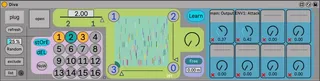
dirty VST wrapper preseter morpher
This free device allows to store and recall the whole state ...
- Type
- Instrument
- Author
- schlam
- Version
- 3.7
- License
- AttributionNonCommercialShareAlike
- Live version
- 10.3.20
- Max version
- 8.5.7
- Downloads
- 644
- Updated
- 2024-01-23
dirty VST wrapper preseter morpher is an Instrument for Ableton Live by schlam, distributed as Creative Commons Attribution-NonCommercial-ShareAlike. It targets Live 10.3.20 and Max 8.5.7. On maxforlive.com it has 644 downloads. First published 2024-01-15, last updated 2024-01-23. 52 user comments below.
New to Max for Live? Read what Instruments do, what the AttributionNonCommercialShareAlike license means, how to install a device.
Description
This free device allows to store and recall the whole state of a VST plugin (no 128 parameters limit), thoses presets can be morphed with sliders, line interpolation, randomized.... You can easily recall any state of A VST plugin when launching a clip. Parameters can be easily excluded of the process. beta
FEAT:
¤ Store / Recall any state of any VST.
¤ Choose a ramp time between two presets to make a transition.
¤ This ramp time can be free (from 1 ms to 1 minute) ...
¤ ... or in sync with Live's tempo (from 1/16 to 16 bars).
¤ Morphing between 2, or 3, or 4 presets with mappable sliders
¤ Each preset can be triggered with mapping/automation (and with transition)
¤ Random feature with exclude/include capabilities.
¤ Random dosing
¤ A dial brows all saved presets, its stroke is always a function of the number of recorded presets, even if there are empty slots. Mapping this dial to a hardware knob allows to distribute all the current presets around it.
¤ 8 automatables dials can control VST params, you can exclude\include them while morphing/recalling/randoming
SETUP
_click PLUG
_choose a VST
_open the VST with the square button
_press EXCLUDE and move all the parameters you don't want to be saved in the preseter/randomizer (double click in the list to delete)
_press EXCLUDE again to leave "learn mode"
_choose a sound or press random
_Press STORE and click on a preset slot
___all the parameters will be stored (no 128 parameters limitation)
_choose another sound or press random
__press STORE again and click another slot
Then..
-you can automate in a clip the numbox PRESET to load presets with clips
if you draw an envelop with PRESET from 1 to 2
->the VST will morph from preset 1 to 2
if you draw an envelop from 1 to 3
->the VST will morph from 1 to 2 and then from 2 to 3
if you want to only morph from preset 1 to 3, without going through the preset 2 :
__choose 1 for the "INTERP_FROM" and 3 for the "INTERP_TO"
__draw an envelop of the parameter "INTERP_SLIDER" (0-127)
________________________________________
RELEASE NOTES_______________________________________
V1 : Just to help someone in the forum looking for a way to easily use dummy clips to send preset changes to a vst... I didn't plan to update it but...
V2 : ...Everything has been changed. Now the device is a mod of my device "Variation for L10 for L11", so there is a lot more options
https://maxforlive.com/library/device/7665/variation-for-l10-for-l11-and-l10-audio-version
V3 : 8 automatables macros that can be excluded from recalling/morphing/randoming
the number of parameters saved per VST is 4096
Exclusion of parameters is now dynamic and displayed in a list
The current VST name is displayed in the title of the device
V3.5 : what's new..
The new Button "Now" allows to store the current tweaked state. Then if you press another slot AND if there is a ramp time choosen, the transition will begin from this state without drops.
Double click in the list exclusion to delete a parameter
Note that you can exclude all the parameters by clicking Exclude and then Random. Then you can include just some parameters by deleting them from the list. Note too that when a parameter has been excluded, it will be store anyway in the preset. A excuded parameter is saved and just not recalled.
Random has a new function to only random the non excluded parameters from just a little bit to drasticly
Add info view for parameters...
LOTs of big and littles improvements
and bugs fix...
...and surely new ones =)
v3.7
Yes there were a regression in 3.5 where states of the device was not well restored when live re-opens. It's fixed.
A new "ALL" button allows to exclude all the parameters. It's useful with big VST synths like Diva where a lot of the 281 parameters are "under the wood" parameters and don't have to be proceded IMO. This button appears when "exclude" is engaged.
Another "ALL" button appears when "del" is engaged. it allows to delete all the presets. Double clicking this button erases all the presets, and the exclusions, and the macro assignations..
The random dozing is more accurate
The process of exclusion had been totally rebuilt. Note that it's no longer possible to always exclude a parameter directly in the VST in some situations (while Live transport is running or when an interpolation is performing). If transport is not running or if there is no ramptime, parameters can be choosen in the VST. Note too that parameters in this case don't have to be moved anymore, just click it. This way selecting a parameter doesn't change the sound)
Drag an drop plugin anywhere in the device
Lot of little bug fixs....
...and surely new ones again =)
________STilll a BETA not tested on each VST...works very well with Diva for example...but can be slow with some big VST3 synths with more than 2000 parameters... but seems to work well with the same big plugin in VST2 version... I have an idea of the problem, I am investigating..
Don't forget to click REFRESH when you load a different VST plugin
_______
____________
_____________________
_________________________
cheers
Julien
Comments (52)
You made this patch just for helping someone ? °° ...
That's crazzy ! It' been decade i wait a patch like this !
1) no limit in the number of parameters (no more stupid 127 ableton limit)
2) snaps / recall functions
3) randomess of parameters at will to create new patch
That's just thé grall for me !!!
Could you explain how to also see and be able to map parameters ?
i will continue to use Clyphx that is a great alternative but .... Ableton 127 parameters limit is....
Yes its not really "just for you" I made it.
I made it for me a long time ago and decided after reading your post in the forum ti quickly publish it. I said I didnt plan to update it because this device is working for what I ask to it. Of course if little changes has to be lade I will try to make them...
Just choose and open a vst with this device.
Then all the parameters of the vst will be stored/recalled/morphed/randomized/glitched.
If you want to exclude parameters just press "exclude" move the parameters you want to be excluded, and press Exclude again BEFORE storing the presets you want to play with
https://forum.ableton.com/viewtopic.php?t=249097
Tested with L10 and L11
And I am glas that you are so happy but I don't think this device is sooo new =)
cheers
The biggest VST I have is Diva (281 parameters) and It's working good when morphing with the 4x pad..
Maybe you excluded some parameters by mistake ?
Press "clear exceptions" and store again some presets..
It's the same ?
I am downloading it.
Can you precisely explain me the situation where all the parameters are not correctly saved/morphed. I will try to understand the problem
Each parameter can be tweaked, even after a preset has been saved..
But since all "non excluded" parameters are saved/morphed, effectively you cannot automate a parameter while it is morphed, but you can exclude it..
I am looking for a more clever way to achieve that but you have to explain me.more...;)
Then what i mean is having something like 8 to 32 macros exposed on youre device . Each macro would have thé ability to get assign to a particular vst parameter (like on "théE4L VST Loader Midi 1.0 by d5x610") . Also each macro could be midi mappable and could be automated . Like if we would expose a normal vst parameter on ableton .
a
while morphing between two preset there is a moment where a new sound is interesting and you just want to move ,then, some few parameters like filter , or , just the osc pitch or something else. live , in the "music" moment. those macro would be there for that.
I can imagine , those knobs with your preset snap/morph/recall device . that would be , for me , the patch i was always looking for !
Already thanks so mutch for this already !
But what don"t allow you to simply map the parameter you want to tweak after ?? Anyway I will add few knobs if you want ;)
Did i mess something ? i didn't find a way to do that ? i can't see any vst parameters exposed . Also the way ou integrated exclusion is great , because it will be possible to automate/midi map with the knobs such parameter as filter cutoff for exemple , that it could be seperatly automated while morphing .
I misunderstood =)
v3 coming soon
And I downloaded Oddity it has more than 1000 parameters
the vst3 version has 3171 parameters !
the current version of the device was limited in fact to 512 parameters, it's fixed in v3
Of course you can pay me a beer !! =)
It should be possible by paypal with my mail " [email protected] "
cheers
Regarding the device, would it be possible to add 8 more macro controls? I use Push and a secondary controller with 8 knobs. This way, I could manage 16 parameters simultaneously while morphing. I've experimented with this setup and it's fantastic! Being in the middle of a morph, with the sound evolving, and then adjusting the oscillator pitch or the cutoff is just exhilarating! I'd love to take it a step further and continue morphing from there. For this, a temporary 'snapshot' feature that isn't part of the regular snapshot slots would be ideal. This would allow transitioning from the current morph to other pre-saved snapshots. It would be great to tweak parameters mid-morph, hit a 'temporary snapshot' button, and then continue morphing to another snapshot with dynamic parameter changes.
Another issue is the Max for Live VST window; it keeps disappearing behind Ableton. Is there a way to 'pin' the window so it stays on top of Ableton?
Bug : when i try to make an automation from the Knob and i want to play this automation , the automation is disabled on the clip on the timeline .
Also excluding the parameters that are on macro does not resolve the problem .
improve : Would it be also possible to directly select from "exclude" button the parameters of the macro instead of having to go back to the vst and select them (it is also a great way to do that !)
That's all ! thanks !
_The Vst windows that dont stat on top seems to be an old MaxMSP bug.
_I dont have Push
_I don"t plan to add more macros.
Yes it's a beta with bugs ;)
I dont have time anymore during next weeks, sorry.
I was in Paris until yesterday, the device was made in the train to here, where I live, in Sète, at the south of France ;)
and even more maybe...
still want my beer =)
cheers
v3.5 doen't recall properly presets when live.Set is opened.
it's fixed in the next release..
Hoping not to leave any main capability out:
You can use this device to recall VST devices configurations, morph between them and randomise the value of its parameters
The device also allows you to exclude parameters of the VST device from being altered by the previous listed actions.
I hope this helps.
Hello FreddyFingaz. Yes that's it. Did you manage to make it worked ? Note that the mains parameters of the devices have shorts explanations in the info view of Live
I understand if you don't want to develop the device further, but if there was a way to add a sidechain input to take audio from other channels so that the device could work with audio fx vsts, that would be super useful! Anyway, thanks again!
Thank you for your words ! ;)
I do not use VST with sidechain at all but i imagine it should be very easy to implement.
Please give me a link to a free/demo vst with sidechain. I will try to add this feature.
Cheers !
https://analogobsession.com/ and https://www.fullbucket.de/music/vst.html
Analof Obsession is more on Dynamic, eq etc and Fullbucket on emulation on synth and Fx plugin
here is a link to a gold compressor from Analog Obsession :
BusterSe .
https://www.patreon.com/posts/fetcb-92444426
You can download the plugin freely
.
BusterSe have sidechain compression to.
just clic the "ext" on the sidechain panel.
Of course you will have to send signal to the sidechain and signal to the input as a normal sidechain compressor .
But if that's too big of a task, being able utilize the sidechain input on plugins that already have it would definitely still a useful enhancement!
Thanks for sharing your work, cheers!
Also thanks for posting links to the free sidechainable plugins zengel