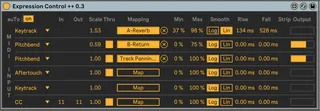
Expression Control plus plus
..................................................... ...
- Type
- MIDI Effect
- Author
- schlam
- Version
- 0.3
- License
- None
- Live version
- 10.1.30
- Max version
- 8.1.8
- Downloads
- 2,135
- Updated
- 2021-02-04
Expression Control plus plus is a MIDI Effect for Ableton Live by schlam, distributed as freeware, with no license specified by the author. It targets Live 10.1.30 and Max 8.1.8. On maxforlive.com it has 2,135 downloads. First published 2021-01-25, last updated 2021-02-04. 6 user comments below.
New to Max for Live? Read what MIDI Effects do, how device licenses work, how to install a device.
Description
.....................................................
.............DISCONTINUED, replaced by eXp++ :
--->
https://maxforlive.com/library/device/6947/exp-plus-plus
......................................................
Hello,
this device is based on Expression Control + by Simon Rivet
https://maxforlive.com/library/device/5695/expression-control-plus
which is based on the m4l stock device Expression Control.
ExpressionControl++ releases all the controlled parameters when the device is not in the selected chain of the rack it is, but it remaps them automatically when you move the chain selector on it again.
So it is possible to have totally differents mapping settings on the whole live set depending of a chain selector..
As the original Expression Controller, you can control mapped parameters with Velocity, Pitchbend, KeyTrack, ModWheel, Pitchbend, Aftertouch, and SimonR added the possibility to use Control Changes and lot of more accurated settings. Visit his page for more informations.
----------------------------------------SETUP
---FIRST : create a MIDI rack in a MIDI track
(don't put the device on a track and then group the device to create the rack,
create the rack first and then put the device at the BEGINNING of the 1st chain.)
---SECOND : drag & drop from Live's navigator one (or more) another instance of the device per chain
For chain 1, move the selector of the chain to [0-0]
For chain 2 --> [1-1]
for chain 3 --> [2-2]
etc...
The device works anyway if you don't do that, but you will have to untoggle the little arrow which select the active chain...
because it's not the cursor of each chain that do the trick but the
ORDER of the chain.
--> So : Don't change the chain's order in the Rack
(but you can add anothers chains at the end when you want)
--- Put the chain selector on 1st position
--- On the device in the 1st chain, map what you want and tweak the device.
--- Put the chain selector on 2nd position
---On the device of the 2nd chain, map parameters (they could be alrealdy map by the 1st device =)
---etc..
---map the Chain Selector to a controller
---enjoy ! (if there's no bug..=)
--->tip : map the chain selector to a macro and change the course of this macro by the number of chain and then map this macro to a controller...
Voila, now the Chain selector change all the bindings and mappings of the live set, choose an empty chain and everything is unbinded.
Hope it will be helpful !
Cheers
Julien
News in V° 0.3 :
- Device can be in any track and position on the chain
- Possible to have several devices per chain
News in V° 0.2 :
- no need anymore to use "auto bypass chain" from WeirdNoise. the functionnality is embed in the device
- add an "auTo Binding/Unbind" button to use the device "simply" as the original one
If you just want one mapping setting whatever the chain selector of this rack is: put this option to Off
Comments (6)
you can see it there :
https://maxforlive.com/library/device/6922/map-plus-plus
cheers
Julien
I wanted to mod expresioncontrol so to add one more option to these:
- velocity
- modwheel
- pitchbend
- aftertouch
- keytrack
- note
- control change
that would be release velocity (note off) I know mostly no one uses because almost no keyboard implements it, Roland does.
but I have 0 idea how to start doing that, I assume I could just copy paste and find where the parameters read the midi monitor/controller data.. but can't find it.
im trying to learn but if you or some kind soul have the time and ease to do this, would be quite awesome
wanted it just for plain decay per note variation, but with this I'd sure try reverb time or just about anything
Please can you help, none of the mapped assignments are saved when i save within an .adg file. when i recall the saved .adg file, all of the mapped assignments are disconnected and I have to re-do them.
PLEASE, can you fix this? I used your previous expression control to create a couple hundred .adg files with synth parameters etc mapped to expression in Livew 11.1.6, and now with 11.2.7 and now they are all lost. This is so much work, can you please fix this????
PLEASE CAN YOU FIX THIS, I LOSE HUNDREDS OF HOURS OF WORK???