- Type
- MIDI Effect
- Author
- RoelVanderPaal
- Version
- 1.0
- License
- Attribution
- Live version
- 8.2.7
- Max version
- 5.1.9
- Downloads
- 1,218
- Updated
- No Updates
MOSCO Moog Voyager is a MIDI Effect for Ableton Live by RoelVanderPaal, distributed as Creative Commons Attribution. It targets Live 8.2.7 and Max 5.1.9. On maxforlive.com it has 1,218 downloads. Published 2012-01-27. 10 user comments below.
New to Max for Live? Read what MIDI Effects do, what the Attribution license means, how to install a device.
Description
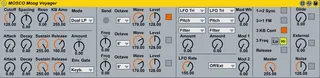
MIDI Controller for the Moog Voyager.
Usage:
- Put this on a MIDI track together with an external instrument configured for the Moog Voyager
- Responds to knob changes from the Moog Voyager
- All parameters from this device are stored when making presets, so this makes it very easy to manage presets for the Moog Voyager from within Ableton. Of course all parameters can also be automated in Ableton.
- The 'Send' button sends all parameters (=CC messages) to the Moog Voyager. This is useful in case the Moog Voyager gets desynchronized for whatever reason. I also noticed that M4L sometimes does not send all parameters to the Moog Voyager when opening a preset, this might be a little bug in M4L. Also in this case the 'Send' button can solve this problem.
Comments (10)
Getting a preset from the Moog to the plugin must be done via System Exclusive messages, which is currently not supported by M4L.
'Reading data': if you mean uploading the Moog's internal preset to the computer, that is not possible (see above)
if you mean controlling the parameters by turning the knobs on the Moog, you must enable MIDI OUT on the Moog (and connect the MIDI OUT to your computer of course). It is also a good idea to switch MIDI MERGE off, to avoid a MIDI loop.
Thank you for creating this device. I used it as a start to create one that has patch memory in it. You have to import all the banks into the patch to work but you can then control the patch change from Live and have all the parameters match in live and on the Voyager. Check out the device and code if you would like.
I have not implemented a system that if you change a parameter it saves the patch in Live and on the Voyager yet.
http://www.maxforlive.com/library/device/3039/voyager-with-patch-memory-recall
Thank you for sharing your device.
techbuzz
I updated the interface and added the Voyager XL LFO2 functions in a new device called Voyager XL MIDI Controller, available for free in the library.
http://www.maxforlive.com/library/device.php?id=5248
I'm having trouble to run you magnificent device with my Voyager Select Series (firmware 3.5). Everything seems to work ok, but when I automate a parameter, there's a long time lagging between what I do in Live, and the sounds that comes out of the synth. I would be very, very grateful if you could give me some advice on how to set up all MIDI parameters in both the Minimoog and Live.
Anyways, thank you for this device. If I get to make it work as expected, it'll be the best tool to work with my Minimoog ever!