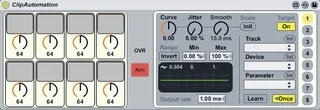
ClipAutomation
It's a device which allows you to record clip automation to...
- Type
- MIDI Effect
- Author
- Crampe
- Version
- 1.0
- License
- None
- Live version
- 8.2.2
- Max version
- 5.1.8
- Downloads
- 612
- Updated
- 2012-02-02
ClipAutomation is a MIDI Effect for Ableton Live by Crampe, distributed as freeware, with no license specified by the author. It targets Live 8.2.2 and Max 5.1.8. On maxforlive.com it has 612 downloads. First published 2012-02-01, last updated 2012-02-02. 12 user comments below.
New to Max for Live? Read what MIDI Effects do, how device licenses work, how to install a device.
Description
It's a device which allows you to record clip automation to workaround Live's limitation.
Details and instructions on the link below.
01-02-12
Due to a little error, the 4th knob on the device didn't control the parameter it was attached to.
If you didn't solve the problem by yourself, I've update the device.
+ clearer display.
Comments (12)
is f*kin great ! thanks for your efforts
But.. I am having a little trouble getting it working.. in your instructions you say that the explanations are inside the device.
I've unfrozen the device but can't find the instructions.
Can you point me in the right direction?
Many thanks for sharing!
Jimmy
This is how I did it..
Open up the patch.
Go into presentation mode.
Make sure the patch is locked then double click on 'p controller input'- the instructions appear.
Unfreeze and unlock the patch and follow the instructions.
Great stuff.. ta very much!
Hope this is clear.
Cheers.
Jul
There have been several attempts to transcend Live's limited recording capacities in session view, and I think this attempt is the most convenient so far.
Due to a little error, the 4th knob on the device didn't control the parameter it was attached to.
If you didn't solve the problem by yourself, I've update the device (it's still version 1.0 though).
Cheers
Jul
what does this mean and how do you switch "banks"?
"text" : "One more important thing : you need to use a bank which is different from the one you use with the Live Instant Mapping (blue hand), otherwise Live won't record your automations.",
I'm no slouch to this stuff either, this is kind of confusing.
I have tried what I could find; I was able to get into the 'p controller input' and edit it according to the instructions - my midi controller sends CC 61 to 68 so I made the integer box subtract 60 (I also tried changing my controller and using other CC numbers).
I tried changing the settings of Arm, Global and OVR on the device, I tried recording the automation while recording the melody, I tried recording it onto the midi track and onto the track receiving the automation..
I am also confused about these "banks".. What are they and how do I change them?
Best,
jorgen