- Type
- MIDI Transformation
- Author
- Gross9978
- Version
- 2.1
- License
- AttributionNonCommercialShareAlike
- Live version
- 12.2
- Max version
- 9.0.7
- Downloads
- 565
- Updated
- 2025-06-22
DrumMaker is a MIDI Transformation for Ableton Live by Gross9978, distributed as Creative Commons Attribution-NonCommercial-ShareAlike. It targets Live 12.2 and Max 9.0.7. On maxforlive.com it has 565 downloads. First published 2024-08-26, last updated 2025-06-22. 2 user comments below.
New to Max for Live? Read what MIDI Transformations do, what the AttributionNonCommercialShareAlike license means, how to install a device.
Description
2.1 Added UI scaling
2- completely rewritten in JS,
new UI using V8ui
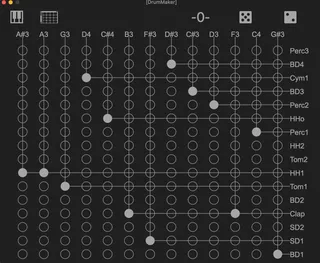
Changed the device to a popout window that has a grid used to redistribute the notes
upon loading the tool if it doesn't automatically find the notes/drumrack make sure the notes are selected and click the piano/drumrack icons in the top left corner.
Clicking in the grid will move the corresponding note to the pitch of the drum
in the top right are buttons for reseting, randomizing and shuffling the grid
1.1 bug fix/UI tweak. DrumMaker now only effects the midi in the clip once a pitch has been selected, the automatic remapping was driving me crazy. It still auto populates the available pitches you just have to select each one before they'll take effect. If there's less than 8 available pitches it now leaves off the remaining lanes. I think it makes it easier to use that way.
DrumMaker lets you take a MidiClip and repurpose the available pitches for use with a DrumRack.
Click the Drumrack on the bottom right and click the piano keys at the bottom left an it'll get the first 16 cells of a drum rack along with all of the available pitches in the clip. It'll automatically set the first 8 pitches to the first 8 cells in the rack but if you click on the cell name or note you can select other cells/pitches to use instead.
I mainly use it for quickly remapping long midi clips generated by sequencers.
Comments (2)