- Type
- MIDI Generator
- Author
- Gross9978
- Version
- 2.1
- License
- AttributionNonCommercialShareAlike
- Live version
- 12.2
- Max version
- 9.0.7
- Downloads
- 1,247
- Updated
- 2025-06-30
SliceTool is a MIDI Generator for Ableton Live by Gross9978, distributed as Creative Commons Attribution-NonCommercial-ShareAlike. It targets Live 12.2 and Max 9.0.7. On maxforlive.com it has 1,247 downloads. First published 2024-09-12, last updated 2025-06-30. 8 user comments below.
New to Max for Live? Read what MIDI Generators do, what the AttributionNonCommercialShareAlike license means, how to install a device.
Description
2.1- Reworked how SliceTool determines length/positions, it should now work better with samples of all sizes.
For me it's working with almost any sample in either mode. If something seems off after swapping samples multiple times while using the tool- click "Re"sync/"Sync", try adjusting an observed parameter on Simpler like transient sensitivity or beat division. If those don't work try dragging the sample to an audio track and bounce in place, then drag the bounced clip into Simpler instead of the original sample.
2- completely rewritten in JS,
new UI using V8ui
Simpler no longer needs to be the first device on the track, it should find the Simpler regardless of being in a rack or nested rack.
removed unnecessary modes
added a toggle under the mode selection that changes the way randomization is used
1-(old way) each note is random within the available range
2- if a single note is randomized there's no change but if two or more notes in a row are randomized the notes will be in consecutive order with only the first note being randomized.
1.3-Bug fix SliceTool no longer outputs notes until a parameter has been changed or sync is clicked. Previously it would add notes to a clip unexpectedly when selecting a clip after opening a project.
1.2- Added a selectable mode for determining note positions, SliceTool nows stays in sync with Simpler and changes to Simpler are reflected in real time.
Mode A Is the old one and works with Simpler "Sliced by Beat" It works with any sample length but only with "Slice by Beats Mode"
Mode B will work with any of the Slice modes but was intended to work with "Sliced by Transients Mode" its intended to work with samples 1-4 bars long but should work with anything 32 bars or less. Above that length it may/may not work.
Thing to note-
If using Mode B make sure to "Warp as" the recommended amount on Simpler, it can sometimes make a difference.
Mode B uses the Slices position in the sample to determine note positions. Simpler only has 64 Slices so if you're using Mode B with Transients on a long sample and all 64 are used up the remainder of the pattern will be empty before looping.
For me everything is working as it should but I feel like others may have different results depending on their sample collection, if you use it and consistently find samples, that meet the above criteria, that don't work as expected feel free to hit me up/send me the samples and I'll check it out when I have the time.
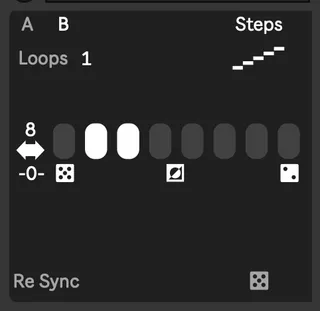
1.1- Changed the UI a bit and added a "Steps" mode that let you choose which steps, out of up to 16, gets randomized per bar. It should also work with longer loops correctly now.
SliceTool lets you create midi for sliced loops in Simpler. Once you have a loop sliced in simpler open the tool from the MidiGenerate tab and click "sync" this will create 1-8 loops of midi depending on the selected mode-
Normal- the loop as originally recorded
Random- the loop randomized
Random Nth-the loop normal with a chosen random amount at the end
Random N every N- a chosen amount of normal followed by a chosen amount of random each bar
It should stay in sync with the simpler on the track if you change Divisions but if it ever gets out of wack clicking "sync" and changing modes will get it working again.
Clicking "Make Notes" only serves a purpose when using one of the random modes, clicking it will randomize the notes if you want to try different results.
I originally made this just to get straight loops into a clip quickly to further modify with other tools but added the other modes for fun. Hope you dig it.
Comments (8)
Thank you.