a better search for max devices
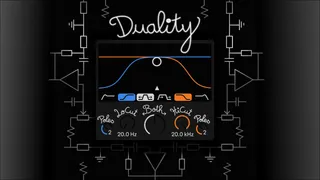
Duality screenshot

Duality

by Rawton

Duality is a combined high-pass and low-pass filter designed...

View on maxforlive.com Website

Type
Audio Effect
Author
Rawton
Version
1.3
License
Commercial
Live version
12.1.5
Max version
9.0.4
Downloads
0
Updated
2025-02-01

Description

Duality is a combined high-pass and low-pass filter designed to provide precise and efficient control over the frequency spectrum. Its defining feature is the Both mode, which allows simultaneous adjustment of both filter cutoff frequencies using a single parameter. Highly modulable, it is designed to pair seamlessly with the “Flexion” modulator.

👉 Watch demo here: https://youtu.be/EJLGZlC-BSM

🚀 The first 100 people can download it for free! After that, it will become a paid device.

Got questions or feedback? Feel free to reach out at [email protected] – I’d love to hear from you and help you get the most out of this device!

Comments (12)

  • shinytheshiny · February 01 2025
    thanks for the free download! the device UI is not showing properly on 12.1, mac m1, ventura 13.5. the bottom half is all crammed together.
  • Rawton · February 01 2025
    Hi! Sorry to hear that. Could you send me a screenshot at [email protected]?
    Thanks !
  • Rawton · February 01 2025
    I think I found the issue. Please re-download version 1.1, and it should work properly.
  • MartinH76 · February 01 2025
    Thank you for the free device! I've just downloaded this and v1.1 has the same issue for me as the other poster - the bottom half of the device isn't displaying properly; all of the labels are overlapping each other so it's all a bit of a jumble. I'm on a Macbook Pro M1, Sonoma 14.7.2 and Ableton 12.1.5. I tried changing the Live display zoom levels to see what happened but it doesn't change the squashed together-i-ness. I can send a screenshot if you still need one!
  • enchse · February 01 2025
    I have the same issue even on v1.2 but I noticed that the problem is Max9 – UI is fine when I switch to Max bundled version... Thank you so much for sharing your devices for free!!!!
  • Rawton · February 01 2025
    ah, it's strange, I can't reproduce the issue with all display settings. However, I may have found the solution. I adjusted the positions of all UI elements to be pixel-perfect. Some were using float values, which could have affected how they were rendered on your screen. feel free to re-download version 1.2
    I am very sorry for the inconvenience!
  • Rawton · February 01 2025
    Hey enchse,
    A huge thank you! Thanks to your help, I was finally able to fix the issue. As you suspected, it was indeed because I didn't have the latest version of Max 9 updated. Now everything is sorted in version 1.3, and honestly… that was something! 😅
    Thanks again for your support, it really helped me! 🙌
    Talk soon!
  • enchse · February 01 2025
    Yea everything looks good now!! Glad I helped! keep up the good work!
  • Gluecksairchen · February 01 2025
    This device is amazing! buttery smooth and yet grippy, if you want to.
    And I really like the interface - this will be my new go-to filter 🙌🏼
  • FreddyFingaz · February 01 2025
    Wow, sweet - thanks so much!
  • MartinH76 · February 01 2025
    Thanks so much for fixing this so quickly - 1.3 is perfect. And what a great device! I'll definitely be checking out Flexion next 🙂
  • Axis08 · February 02 2025
    It's the only thing that slowly stops the ache....
    Great device, simple and effective, thanks

← Back to search