Microscopic Transient Designer
MTD – the Ultra-Fast Gate & Compressor MTD is a pre...
- Type
- Audio Effect
- Author
- Hyde
- Version
- 1.0
- License
- None
- Live version
- 11.3.41
- Max version
- 8.6.2
- Downloads
- 326
- Updated
- 2025-02-18
Microscopic Transient Designer is an Audio Effect for Ableton Live by Hyde, distributed as freeware, with no license specified by the author. It targets Live 11.3.41 and Max 8.6.2. On maxforlive.com it has 326 downloads. Published 2025-02-18. 1 user comment below.
New to Max for Live? Read what Audio Effects do, how device licenses work, how to install a device.
Description
MTD – the Ultra-Fast Gate & Compressor
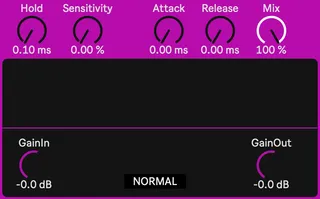
MTD is a precision tool for shaping transients at a microscopic level, functioning as both an ultra-fast gate and an aggressive compressor in inverted mode. Whether you want to create dynamic digital distortions, sculpt percussive elements, or design unnatural envelopes, this effect gives you fine control over the attack and decay of any sound.
Hold & Sensitivity: Work together to determine when the effect engages. Hold sets the timeframe for analysis, while Sensitivity dictates how much sound within that window is needed to trigger the effect.
Attack & Release: Control the effect’s response time in a familiar way—Attack determines how quickly it engages, and Release sets how fast it disengages.
Hold Time Impact: The Hold parameter extends the time between Attack and Release, shaping the overall envelope of the effect.
Perfect for creative sound design and precise transient control, MTD is designed for experimental processing, glitch effects, and aggressive rhythmic gating. Carve out razor-sharp transients, create unpredictable percussive textures, and stuttering digital distortions. It can also be used to introduce hyper-detailed gating effects on drums and percussion, making each hit sound tight and snappy.
Comments (1)
it needs to be frozen, then reuploaded.
looking forward to trying this out