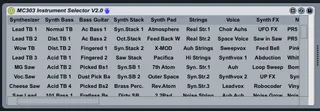
MC303 Instrument Selector
you can select the sound presets of the MC303 over MIDI
- Type
- MIDI Effect
- Author
- five100
- Version
- 2.0
- License
- None
- Live version
- 8.3
- Max version
- 5.1.9
- Downloads
- 508
- Updated
- No Updates
MC303 Instrument Selector is a MIDI Effect for Ableton Live by five100, distributed as freeware, with no license specified by the author. It targets Live 8.3 and Max 5.1.9. On maxforlive.com it has 508 downloads. Published 2012-08-20. 6 user comments below.
New to Max for Live? Read what MIDI Effects do, how device licenses work, how to install a device.
Description
you can select the sound presets of the MC303 over MIDI
Comments (6)
Congratulations and thank you very much for this great tool.
One thing doesnt want to work for me. I can't change the drumkits. I choose the rhythm part on MC-303. The different drumsounds are coming from different notes, but after writing a midi clip, i cant change the drumkits. At the instrument parts everythings working fine.
Any idea? :)
Thanks for the stuff once again.
As I see only one part is usable of a time. Or is there anyway to use play more parts at the same time. For example the rhytm part and one instrument for bassline?