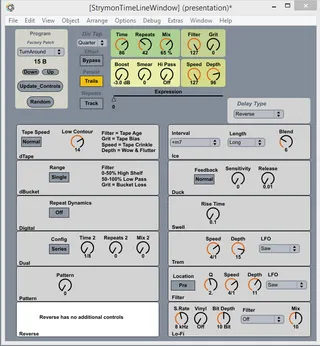
Strymon Timeline Control Device
This device provides editing of the Strymon Timeline via Mi...
- Type
- MIDI Effect
- Author
- DLWhite
- Version
- 2.5
- License
- AttributionNonCommercial
- Live version
- 9.1
- Max version
- 6.1.0
- Downloads
- 859
- Updated
- 2014-06-03
Strymon Timeline Control Device is a MIDI Effect for Ableton Live by DLWhite, distributed as Creative Commons Attribution-NonCommercial. It targets Live 9.1 and Max 6.1.0. On maxforlive.com it has 859 downloads. First published 2012-08-24, last updated 2014-06-03. 12 user comments below.
New to Max for Live? Read what MIDI Effects do, what the AttributionNonCommercial license means, how to install a device.
Description
This device provides editing of the Strymon Timeline via Midi from a Live Device. Drop into a Midi Track, set the Track, Midi-To to port/channel of Timeline. Set Track, Midi-From to port/channel of Timeline. Set Monitor to "In"
V2.5 update
Minor update to fix the "up" button.
v2.4 update
Cleaned up a fair amount of code related to the random, up/down, and patch name/number. It's easier to read and modify. Also added auto update of controls when a patch is changed either from the patcher or from the physical pedal if you use a udpreceive in a max patch.
See this patch
https://drive.google.com/file/d/0BwQ07Unq5diEMkcwa2luZkNDNUE/edit?usp=sharing
which you can run in Max Runtime (required because Live + MaxforLive doesn't support Sysex output - makes no sense to me, but there you go. )
V1.5
Added Named Patch Selection Live.Menu. - Selects the patch by name using Factory Defaults. Random may choose any patch and patch name will reflect the factory name for that slot (patch 100-199 duplicates 0-99).
If Patch Change Global is on for the Strymon, the Patch Name (using Factory preset names) will update in the UI.
Provides editing of all Midi Accessible parameters including those unique to each Delay type.
There is no live-based "save" feature.
Wanted To do:
Add a Live "save/name Patch" (won't save back to the timeline, but will at least save configurations to Live)
Comments (12)
Is there a way to write backwards into this plugin? I mean when twisting knobs on the TimeLine itself that the knobs in the plugin pick that up?
I am 100% new to Max for Live and have never ever used it before - you can't imagine how happy I am to find that here because this was the only reason for me to get Max4L.
THANK YOU!
I have next and previous working (and a "random" button for picking a patch randomly). But it doesn't start at the current program (Strymon haven't provided an "increment/decrement" patch function and no way to query what the current patch number is - as far as I can tell).
I'm trying to get the dials to update when a patch changes, but it's proving to be more difficult than I would have thought. I'm close, but some values are updated and then overwritten with a different value.. I'm hoping to work on this some more in the near future and post an update.
Comments welcomed.
one caused by a strymon documentation error (dual time 2 was missing the 2/1 ratio)
And one caused by me (dtape low contour wasn't connected)
Also see my BigSky control as well.
Sysex is next...
Managed to get up and running easily and most functions appear to be working correctly.
The only thing that didn't appear to be working correctly was the "time knob" - when I turned it up on the max for live device it actually turns the time value down on the Strymon and vice versa - i.e. the direction appears to be flipped?
From my quick test of the other knobs, they all appeared to be working correctly.
Any thoughts?
The only other thing to mention is that when I turn the time knob in the Strymon it actually makes the knob in the max for live device turn in the correct directly i.e. turning the strymon time knob up makes the max for live knob go up...