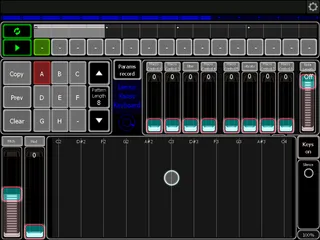
Lemur Kaoss Keyboard159
The Lemur Kaoss Keyboard is a monophonic keyboard for the Le...
- Type
- MIDI Effect
- Author
- xanadu
- License
- None
- Live version
- 8.3
- Max version
- 6.0
- Downloads
- 823
- Updated
- 2012-08-23
Lemur Kaoss Keyboard159 is a MIDI Effect for Ableton Live by xanadu, distributed as freeware, with no license specified by the author. It targets Live 8.3 and Max 6.0. On maxforlive.com it has 823 downloads. First published 2012-08-19, last updated 2012-08-23. 3 user comments below.
New to Max for Live? Read what MIDI Effects do, how device licenses work, how to install a device.
Description
The Lemur Kaoss Keyboard is a monophonic keyboard for the Lemur on the iPad or iPhone. It operates like the keyboards found on the Kaoscilator, the iMS20 and Animoog. It provides looping a pattern, automating 8 parameters and sequencing of patterns. It needs MaxForLive 6 to operate within a Live Set. It is placed at the left side of an instrument rack. The Macros of this rack can then be automated. Alternatively it can be placed at the left of a VST-instrument that uses the first 8 parameters as macros, like Massive, Absynth or KarmaFX.
There are 3 modes of operation. Without looping or sequencing only the notes currently played at the keyboard are send to the synthesizer or sampler. With looping the pattern will repeat itself over time. New notes are replacing previous ones. There are 8 patterns. These can be placed on the sequencer to create a larger structure that can be looped.
Lemur Kaoss Keyboard is installed as a Max MIDI Effect. The file KaossLemur.maxpresets is placed in the same folder. Please note that this device needs Max 6, it does not work with Max 5.
UPDATE: Delete tail option removed. Small enhancements. Lemur files for iPad and Iphone included. PDF Helpfile included.
Comments (3)
best regards
Thanks Myoko. There are lemur files for iPad and iPhone included now.
Xanadu
best regards