- Type
- Audio Effect
- Author
- LiveWorkflowTools
- Version
- 1.1
- License
- Commercial
- Live version
- 12.0.5
- Max version
- 8.6.2
- Downloads
- 0
- Updated
- 2026-04-30
Liveset Cleaner is an Audio Effect for Ableton Live by LiveWorkflowTools, distributed as a commercial (paid) device. It targets Live 12.0.5 and Max 8.6.2. First published 2025-05-28, last updated 2026-04-30.
New to Max for Live? Read what Audio Effects do, what the Commercial license means, how to install a device.
Description
Liveset Cleaner
Clean Your Project in One Click
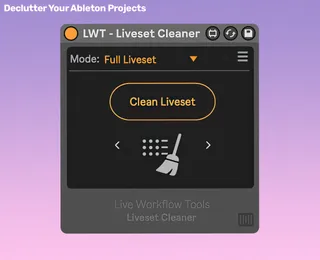
Liveset Cleaner (formerly Session Cleaner) instantly removes clutter from any Ableton project, now fully compatible with both Arrangement and Session View.
Remove empty tracks, muted clips, inactive devices, and unused sends with a single click. Liveset Cleaner even checks for automation data, so your mix stays safe.
Why producers use Liveset Cleaner:
• One-Click Cleanup: Remove empty tracks, muted clips, muted tracks, inactive devices, and unused returns. Clean everything at once or one category at a time.
• Automation-Aware: Tracks with automated mutes and devices with automated on/off are never removed.
• Skips Active Tracks: Input-monitored tracks are preserved, even when they're empty, to keep any custom routings in place.
• Arrangement & Session View: Works across your entire project, whether you write in Session, Arrangement, or both.
• Live Progress Feedback: Every clean shows a progress bar ("Removing 24 / 216 clips"), so you always know what's happening.
• Cancel Anytime: Stop mid-clean with a single click. Progress bar holds where it stopped.
• Lightweight & Native-Feel: Looks and behaves like an Ableton device.
Setup in 3 quick steps
Drop the device into your set.
Hit Clean Liveset.
Done ✅ Your project is instantly decluttered.
Continued support and free feature updates included. If you find an issue or have an idea that makes the device better, simply send me a message.