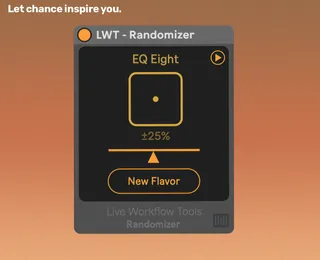
- Type
- Audio Effect
- Author
- LiveWorkflowTools
- Version
- 1.0
- License
- AttributionNoDerivatives
- Live version
- 12.0.5
- Max version
- 8.6.2
- Downloads
- 1
- Updated
- 2026-04-21
Randomizer is an Audio Effect for Ableton Live by LiveWorkflowTools, distributed as Creative Commons Attribution-NoDerivatives. It targets Live 12.0.5 and Max 8.6.2. On maxforlive.com it has 1 downloads. First published 2026-03-10, last updated 2026-04-21. 4 user comments below.
New to Max for Live? Read what Audio Effects do, what the AttributionNoDerivatives license means, how to install a device.
Description
Let Chance Inspire You
One click. Instant new sound. Randomizer applies random variations to any device in Ableton Live - so you spend less time tweaking and more time discovering.
Part of the Live Workflow Tools series - trusted by 3.000+ Ableton Live users.
Why producers use Randomizer:
- Instant randomization: Place it after any instrument or effect, hit the dice button, and get a completely new variation in one click.
- Controlled chaos: Dial in exactly how far values deviate with the amount slider - from subtle tweaks to full-on experiments.
- Parameter editor: Choose exactly which parameters are affected. Nothing changes that you don't want changed.
- Safe defaults: Common parameters like Device On and Output are excluded automatically so your session stays intact.
- Works with everything: Instruments, audio effects, MIDI effects. If it's a device in Live, Randomizer can randomize it.
Get started in 3 quick steps:
1) Drop Randomizer after any device in your set.
2) Hit the dice button.
3) Done ✅ — tweak the amount or pick specific parameters to refine from there.
Free device. Free updates. If you find an issue or have an idea that makes the device better, simply send me a message! Part of the Live Workflow Tools Suite.
Comments (4)
Amazing device but I’d love to have a fix for this. Thanks!