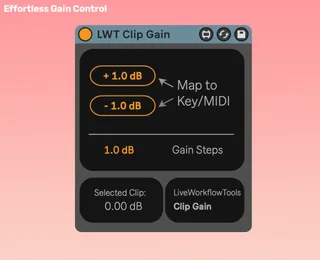
LiveWorkflowTools - Clip Gain
Instant Clip Volume Control Clip Gain lets you adjust...
- Type
- Audio Effect
- Author
- LiveWorkflowTools
- Version
- 1.2.0
- License
- Commercial
- Live version
- 11
- Max version
- 8.2
- Downloads
- 0
- Updated
- 2026-04-21
LiveWorkflowTools - Clip Gain is an Audio Effect for Ableton Live by LiveWorkflowTools, distributed as a commercial (paid) device. It targets Live 11 and Max 8.2. First published 2021-11-30, last updated 2026-04-21. 6 user comments below.
New to Max for Live? Read what Audio Effects do, what the Commercial license means, how to install a device.
Description
Instant Clip Volume Control
Clip Gain lets you adjust the gain of individual clips in Live using custom key or MIDI assignments — no more menu diving.
Set your preferred step size in dB, assign keys or MIDI to the Increase/Decrease buttons, and start controlling clip gain instantly.
Why producers use Clip Gain:
- Keyboard & MIDI Control: Adjust clip gain up or down without touching the mouse.
- Custom Step Size: Define the exact dB change per press for fine or coarse control.
- Works Anywhere: Adjust clips in Arrangement or Session View instantly.
- Stay in the Flow: Tweak levels while playback runs, no need to stop and click.
- Native Feel: Lightweight device designed to blend seamlessly with Live.
Setup in 3 quick steps:
1) Drop the device into your set.
2) Map your keys or MIDI controls.
3) Done ✅ Adjust clip gain instantly as you work.
Continued support and free feature updates included. If you find an issue or have an idea that makes the device better, simply send me a message!
Comments (6)
All these features are found in this version:
https://maxforlive.com/library/device/6720/clipgain-under-your-mouse
That's very misleading and I got complains about this.