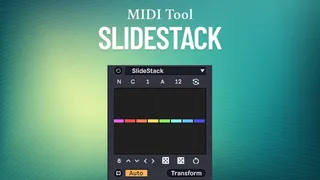
SlideStack
SlideStack is a Max for Live MIDI transformation tool that l...
- Type
- MIDI Transformation
- Author
- carlosbtlr
- Version
- 2.0
- License
- Commercial
- Live version
- 12.2
- Max version
- 9
- Downloads
- 0
- Updated
- 2026-01-16
SlideStack is a MIDI Transformation for Ableton Live by carlosbtlr, distributed as a commercial (paid) device. It targets Live 12.2 and Max 9. First published 2025-06-11, last updated 2026-01-16.
New to Max for Live? Read what MIDI Transformations do, what the Commercial license means, how to install a device.
Description
SlideStack is a Max for Live MIDI transformation tool that lets you add polyphony to entire musical phrases one note at a time. It allows you to build entire harmonies and chord progressions from simple melodies or add additional polyphony to chord sequences from the ground up. Its multi-slider UI lets you edit up to 16 notes or chords simultaneously, allowing you to focus on the big picture instead of on isolated events.
Step Sliders
Add new polyphony notes for specific notes, chords, grid intervals or groups with the UI step sliders. The step sliders can be dragged vertically and horizontally to create complex sequences using broad, long scope gestures.
Grid/Note Mode Toggle
Switch between per-note and interval based transformations. Use this to lock changes to Live's quantization grid.
Custom Groups
Dial in the number of notes you want to group together. Use this to make transformations to groups of notes.
Stack/Transpose Modes
Switch between these two modes to either add new notes to your chords or transpose the existing chord voices.
Chord Voice Selector
Select the chord voice you wish to transpose or use as a starting point to add new notes from.
Additive/Subtractive Modes
Choose whether you want to add or remove notes from the stack. Use this to control the amount of polyphony.
Automatic Scale Awareness
Get automatic scale awareness by just turning on Scale mode in Live. Use this to conform to Live’s scale and root.
UI Controls
Make fast variations with randomization, scrambling, rotation, shifting, reverse and flipping. Use this to try out new polyphonic variations.
Minimum Requirements:
- Ableton Live 12
- Max 9