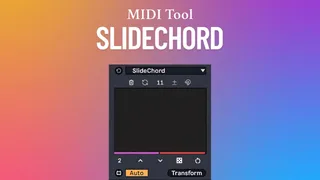
SlideChord
SlideChord is a Max for Live MIDI transformation tool that a...
- Type
- MIDI Transformation
- Author
- carlosbtlr
- Version
- 4.0
- License
- Commercial
- Live version
- 12.1.1
- Max version
- 9.0.7
- Downloads
- 1
- Updated
- 2026-07-14
SlideChord is a MIDI Transformation for Ableton Live by carlosbtlr, distributed as a commercial (paid) device. It targets Live 12.1.1 and Max 9.0.7. On maxforlive.com it has 1 downloads. First published 2025-06-20, last updated 2026-07-14. 3 user comments below.
New to Max for Live? Read what MIDI Transformations do, what the Commercial license means, how to install a device.
Description
SlideChord is a Max for Live MIDI transformation tool that allows you to build chords from single notes as well as modify pre-existing chords in a very fast and intuitive way. Its multi-slider UI lets you construct chords freely by adding upper or lower intervals to a base note of your choosing, allowing you to experiment with chord formations without any constraints. It also allows you to make comprehensive variations to pre-existing chords by allowing you to transpose any selection of chord voices as well as adding and removing chord voices from the chords.
Step Sliders
Add new chord notes for selected notes with the UI step sliders. The step sliders can be dragged vertically and horizontally to create complex sequences using broad, long scope gestures. The alt/option key can be used to reset individual sliders, the shift key can be used to adjust the sliders with higher precision, the ctrl/cmd key can be used to transpose all the slider values up or down simultaneously, the ctrl+shift / cmd+shift plus the alt+shift / option+shift combos can be used to spread and contract slider values, and the ctrl+alt / cmd+option combo can be used to lock step sliders so that they’re not affected by UI changes.
Build/Transform Modes
In Build mode, the sliders generate chord notes on top of pre-existing notes or chords. In Transform mode, the sliders can be used to either transpose or remove chord voices from preexisting chords when Subtract mode is enabled. Both modes work with Live's scale awareness.
Voicing Mode
This mode allows you to shift the chord notes in octaves to achieve different voicings of the same chord. Each slider targets a chord voice starting from the bass.
Slider Ramps
This control allows you to create ramps on the selected amount of sliders while adjusting the interval between each slider. This lets you generate chords based on a single interval or scale degree.
Subtract Mode
This mode allows you to subtract chord voices in Transform mode. It can be used with the Groups and Offset controls to refine the notes you wish to remove from the chord.
Custom Groups
This value will determine the number of consecutive chord voices that will be transposed or removed by each slider in Transform mode. This can be used in conjunction with Offset to shift the group's starting chord voice. This control is only useful in Transform mode.
Transformation Offset
This control shifts the starting voice chord at which a transposition or a subtraction is applied in Transform mode. This control can be used in conjunction with Groups to shift the group's starting chord voice. This control is only useful in Transform mode.
Automatic Scale Awareness
Get automatic scale awareness by just turning on Scale mode in Live. Use this to make chords conform to Live’s scale and root.
UI Controls
Make endless variations with randomization, scrambling, rotation, reverse, flip and shifting. Use this to try out new chord variations.
Minimum Requirements:
- Ableton Live 12
- Max 9
Comments (3)
But thanx anyway for your effort!
https://youtu.be/q-7oOA1Gf98