Launchpad Mashinator
The Launchpad Mashinator is a Max For Live device that turns...
- Type
- MIDI Effect
- Author
- kenan
- Version
- 0.4
- License
- None
- Live version
- 8.3
- Max version
- 5.1.9
- Downloads
- 1,337
- Updated
- 2013-01-21
Launchpad Mashinator is a MIDI Effect for Ableton Live by kenan, distributed as freeware, with no license specified by the author. It targets Live 8.3 and Max 5.1.9. On maxforlive.com it has 1,337 downloads. First published 2012-12-30, last updated 2013-01-21. 1 user comment below.
New to Max for Live? Read what MIDI Effects do, how device licenses work, how to install a device.
Description
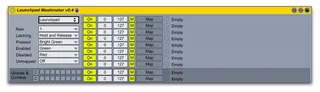
The Launchpad Mashinator is a Max For Live device that turns the User 2 buttons on Novation's Launchpad into momentary buttons for FX mashing awesomeness.
The Mashinator lets you map up to 10 parameters to button presses. Eight of the mappings are tied to the buttons in the selected row on the Launchpad, the other two can be globals or combos. A global is a parameter that turns on whenever you press a button in the row. This is useful for controlling an FX rack when you want the rack off except when you bress any of the control buttons. If you map a global to the rack on/off switch, everytime you press any of the FX buttons, the rack will automatically activate. When you releae the last button, the rack will deactivate.
Combos are exactly what you think they are if you've done your time with Tekken. It is a particular combination of buttons that when they are all pressed--and nothing else is pressed--will activate a new parameter. If you have three buttons controlling FX units and put them into a combo, then you can have a fourth FX kick on when you press all three. This could be used for squeezing that last little bit out of a buildup.
There is a detailed write-up at my web site.
Comments (1)
I wanted this feature so that the Mashinator could support both roles in a row on a Launchpad. In particular, I wanted to mix both types of buttons and didn't want some buttons managed my Mashinator and others midi-mapped. That also wasn't very portable when building and saving custom racks.
Also, I needed toggle support for the Modulatorinator. I wanted to press a Mashinator button and have the modulation run for a bar or so and automatically turn off when complete. The toggle mode is perfect for that.
Enjoy.