- Type
- Audio Effect
- Author
- kenan
- Version
- 0.1
- License
- None
- Live version
- 8.3
- Max version
- 5.1.9
- Downloads
- 697
- Updated
- 2013-01-21
Knobinator is an Audio Effect for Ableton Live by kenan, distributed as freeware, with no license specified by the author. It targets Live 8.3 and Max 5.1.9. On maxforlive.com it has 697 downloads. First published 2013-01-05, last updated 2013-01-21. 5 user comments below.
New to Max for Live? Read what Audio Effects do, how device licenses work, how to install a device.
Description
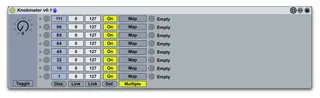
The Knobinator is a device in the Maxinator Collection that maps different values on a knob or slider to individual parameters. You could use it, for example, to create a knob that turns on the track activation buttons of a set of tracks as you turn the knob. More info on my web site.
Comments (5)
MultMap and Knobinator are similar in appearance but have completely different functionality. In terms of functionality, Modulatorinator in manual mode accomplishes the same thing as MultiMap. Of course MultiMap doesn't have a curve setting or a global.
With the Knobinator, the mapped parameters don't move in tandem with the Knobinator Knob, but instead each parameter fires when the knob passes a user specified threshold. I often use Knobinator to control the Grid amount on the Beat Repeat. I might only want 1/32, 1/16, 1/8, and 1/4 grid values--I don't want to use the 1/24, 1/12, and 1/6 values wich are nested between the values I do want.
To accomplish this I map Knobinator to the Grid control, turn off Multiple (since I only want to control the Grid dial), and then using the default threshold distribution (the Dist. button), I set the following in the On Value boxes starting at the bottom: 47, 47, 60, 60, 77, 77, 97, 97. Now as I turn the Knobinator Knob, the Grid control only moves between the desired values. It skips 1/24, 1/12, and 1/6.
Hope this helps explain part of what the Knobinator can do.
One little suggestion,
Is it possible to add modulation on each mapped parameter ?
So I can ideally smoothly fire up parameters.
cheers
i'm guessing you used the beat repeat case as an example so you already know this but for those who don't, beat repeat has a 'no triplets' button just below the 'grid' pot that ticks off the 1/6, 1/12, 1/24, and other values with triplets.
oh, and @kenan, can you tell me where a M4L newb could start if he wants to learn? I really don't have a clue...