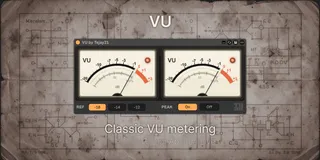
Classic VU metering for Ableton Live
VU is a dedicated stereo VU meter for Ableton Live. ...
- Type
- Audio Effect
- Author
- Tejay21
- Version
- 1.0
- License
- Commercial
- Live version
- 12.0.5
- Max version
- 8.6.2
- Downloads
- 0
- Updated
- 2026-04-26
Classic VU metering for Ableton Live is an Audio Effect for Ableton Live by Tejay21, distributed as a commercial (paid) device. It targets Live 12.0.5 and Max 8.6.2. First published 2026-03-14, last updated 2026-04-26. 3 user comments below.
New to Max for Live? Read what Audio Effects do, what the Commercial license means, how to install a device.
Description
VU is a dedicated stereo VU meter for Ableton Live.
It gives you the slower, more readable feel of classic analog VU metering, helping with gain staging, balance, and overall program level judgment.
By default, it is calibrated to 0 VU = -18 dBFS, with additional options for -14 dBFS and -12 dBFS.
Audio passes through unchanged.
Comments (3)
Thank you very much.
At 0 dB, my digital meter shows -15.
While the plugin seems to be set to -18.
Thanks for pointing this out. The current version of the VU meter is calibrated per channel, so in dual-meter mode each needle reads the left and right channels independently, with 0 VU referenced to the selected per-channel level. Because of that, if you compare it against a stereo digital meter that shows a combined or summed reading, you may see an apparent offset even though the VU itself is behaving as designed.
So this is likely a metering-mode difference rather than a simple calibration error. We’re now considering adding selectable metering modes in a future update, such as L/R, Average, and Sum, to make this behavior clearer and better match different workflows.