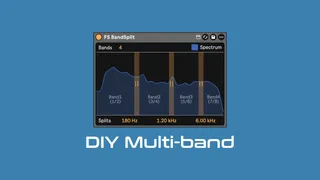
FS BandSplit
Have you ever wanted to apply your existing effects to multi...
- Type
- Audio Effect
- Author
- groovmekanik
- Version
- 2.0
- License
- Commercial
- Live version
- 12.4.1
- Max version
- 9.1.4
- Downloads
- 0
- Updated
- 2026-06-21
FS BandSplit is an Audio Effect for Ableton Live by groovmekanik, distributed as a commercial (paid) device. It targets Live 12.4.1 and Max 9.1.4. Published 2026-06-21.
New to Max for Live? Read what Audio Effects do, what the Commercial license means, how to install a device.
Description
Have you ever wanted to apply your existing effects to multiple frequency bands, using high quality crossovers that can be used in parallel ? Guess what... Now you can!
FS BandSplit combines a unique crossover design with a simple workflow and utility device, so that you can build the Audio Effect Racks of your dreams. 🌈🌥️ Saturate your lows, Redux your mids & Reverb your highs. Maximum fidelity and freedom, with minimum compromise.
🚧 The Problem: Most tools have fixed processing or predefined effects, cannot be used in parallel, and change the sound before processing occurs. Most use crossovers that are not linear phase and those that do often require significant latency and CPU resources. They can also be expensive and unfamiliar, costing you both time and money.
✅ The Solution: FS BandSplit lets you use any of your existing devices or plugins. It is 'parallel-safe' and has less ringing and overshoot than any other design we have tested. The crossover is as close to linear phase as possible, without requiring excessive latency or resources. It is Pay-What-You-Want and integrates into your existing workflow, using familiar concepts like racks and external inputs.
Features:
* Unique, Perfect Reconstruction, 18dB-12dB/oct slope, crossover design.
* Accurate, 1/3rd octave, Spectrum Analyzer, to help you find where to place your Splits.
* Audio Routing utility device that minimizes the potential for feedback.
* Allows any device or plugin can be used across 2, 3, or 4 bands in Live.
* Includes both Mastering & Music Production Examples.
* Helpful Guide, Info View Text, 5ms latency per Split.
A great deal of research has gone into every aspect of this device. Version 2.0 uses the same great crossover, but simplifies setup and eradicates potential for problems, so you are free to create things people have never heard before. 🎛️🎶
Installation is via an Ableton Live Pack (.alp), and requires copying the project into your User Library. It features a User Manual in Live's Lesson View, along with many examples. We will record a video walkthrough of this project, very soon.
This device is 'Pay-What-You-Want', and a great way to add multi-band functionality to Clipper or Ducker. I can't wait to see what people will create with it >> Grab it Now!
If you have any issues, just reply to your receipt and I'll do my best to address them promptly.
Thank you for your support and Happy Music Making 🤘😁🤘
~~~
Compatibility
This device works with Live 11 or 12 Suite, or Standard with the Max For Live add-on.
It will work on Push, including standalone, but the Splits cannot be modified using the Push. This means that you can transfer a Live Set or Rack to Push Standalone and it will work just like it does on your computer, but you cannot adjust Bands or Splits. This avoids a myriad of issues and ensures the device will work reliably in as many situations as possible.
~~~
Crossover Research
The crossover used in this device is the result of my ongoing research into crossover design. It currently uses a fractionally delayed input to align a virtual analog 3rd order Bessel LPF so that a residual high-pass can obtained, resulting in a maximally flat group delay and integer sample latency. I may use this product to investigate new designs, allowing me to gather additional real-world evidence and insight to further my research into finding the ultimate crossover for modern music production. The resulting research will eventually be published publicly.
If you would like to know more about my endeavors into DSP research, feel free to get in touch.