Spectrum Analyzer S
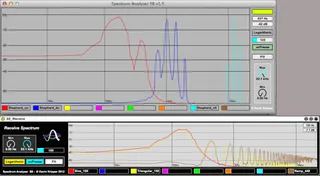
Spectrum Analyzer S8 is a multiple-track real time spectrum ...
- Type
- Audio Effect
- Author
- kevinkripper
- Version
- 81.5
- License
- AttributionNonCommercialNoDerivatives
- Live version
- 9.0.2
- Max version
- 6.1
- Downloads
- 5
- Updated
- 2021-06-21
Spectrum Analyzer S is an Audio Effect for Ableton Live by kevinkripper, distributed as Creative Commons Attribution-NonCommercial-NoDerivatives. It targets Live 9.0.2 and Max 6.1. On maxforlive.com it has 5 downloads. First published 2013-04-03, last updated 2021-06-21. 14 user comments below.
New to Max for Live? Read what Audio Effects do, what the AttributionNonCommercialNoDerivatives license means, how to install a device.
Description
Spectrum Analyzer S8 is a multiple-track real time spectrum analyzer. It lets you visualize the spectral content of 8 stereo tracks simultaneously. You can use it as a frequency overlap detector and actually see which part of the spectrum every single instrument uses. The ideal solution for mixing!
- The M4L version is inspired by the Standalone version, which went 17th place of 55 devices in the Kvr's DC12 (www.kvraudio.com, Developer Challenge 2012): http://www.kvraudio.com/product/spectrum-analyzer-s8-by-kevink
---------------------------------------------------------------------------------
Usage:
S8 is actually very simple. You have 3 modules: send, receive & receive (floating). Put the S8_Send module as an insert in each channel you want to visualise in the spectroscope (which is in any "receive module"). Once you have done that, you need to select a send for each track: you do this by clicking in the numbers (1-8) of the S8_Send module. Each of them have a distinctive color so you can recognise the channels in the spectroscope. Finally go to the Master track on your session and add the S8_Receive module as an insert to visualise the spectrums. Enjoy!
---------------------------------------------------------------------------------
V.1.5:
- S8 is again fully compatible with Live 8.
- Change GUI.
- Added a Fill/Don't Fill Waveforms button.
- Added labels to write what is showing each waveforms (saved with session).
- Added a slider to set the polling interval of the Spectroscope.
- Added a fixed dB and hz visualisation (hz visualisation is only shown when Spectroscope range is 0-22050).
- Fixed dB visualisation: was showing from -45dB to 0dB, now goes from -70dB to 6dB.
- Fixed Log/Linear button.
V.1.4:
- Updated to Live 9.
- Now S8 is post-fader.
- Added a "Show Parameters" button (On/Off)in S8_Receive module.
- Added descriptions in Live's Info View.
V.1.3:
- General code clean up.
- Fixed an issue with the frequency display.
- Change GUI.
- Built a module that is only a floating window with the spectroscope.
V.1.2:
- Added an always-stay-on-top button for the external window.
V.1.1:
- Added buttons to control parameters in the external view.
- Added a detailed display of frequency and amplitude in both views.
Comments (14)
i really want your device, but i don`t have a credit card! what can we do? no paypal??
all the best
andreas
The problem/bug is that there's no display visible unless I choose the "filled" version of the analyzer - I'd really prefer to use the lines, like in the screenshot you've used, but the display is completely blank if I try to use the unfilled version.
My request is just to make the display a bit more "solid", for want of a better word. The colours in the filled display option are so pale I can barely see them, whereas the lines in the screenshot above are nice and clear.
I'm on Live 9.2 and Max 7. Thanks!
Sadly with Max7 you won't see the lines it will only works with the filled version. But you can use Max6 instead!
I’m working on an update of this plugin so stay tuned! Cheers!
I have no real reason to run Max 7, to be honest. Think I'll just stick with 6 for the foreseeable.
Cheers for the excellent device! :-)