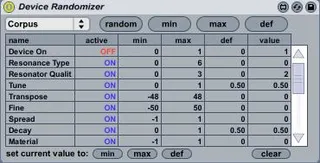
Device Randomizer Fixed for Live
This is an amazing device randomizer by Hanako. However, it ...
- Type
- Audio Effect
- Author
- xmonsta
- Version
- 91.0
- License
- Attribution
- Live version
- 9.0.5
- Max version
- 6.1.3
- Downloads
- 7,218
- Updated
- 2013-10-04
Device Randomizer Fixed for Live is an Audio Effect for Ableton Live by xmonsta, distributed as Creative Commons Attribution. It targets Live 9.0.5 and Max 6.1.3. On maxforlive.com it has 7,218 downloads. First published 2013-09-24, last updated 2013-10-04. 23 user comments below.
New to Max for Live? Read what Audio Effects do, what the Attribution license means, how to install a device.
Description
This is an amazing device randomizer by Hanako. However, it became broken in live 9. I couldnt live without this device, so I fixed it to use in Live 9.
Its so much better than the device randomizer that comes with live 9, because it randomizes every parameter rather than just the first 16 parameters it finds.
The original device for Live 8 is in the beneath link.
Hope you enjoy.
Comments (23)
the whole arrangement mutes
Are you just saying it is quieter than it should be?
If so, search for the volume parameter in the device display and set it to "off". I do this with synths and it makes a lot of difference. With operator you can also set the device to turn of OSCA Volume etc. This will also keep the volumes up.
The min/max/def buttons are producing some unpredictable behavior for me.
Take TAL Noisemaker, which I'm using for a quick place saver bass sound. When I press the top min button, every parameter that is visibly configured in live is at it's minimum value: beautiful. I adjusted a couple things, like subbass to always have some value above say 50%. Then I set the min value with the bottom equivalent button. I press the maximum button, and yes, every parameter moves to its highest value. I pair a few things back, taking the option to use a noise pattern in the Oscilators for example, limiting the attack time of the volume envelope, etc. Then I set the max value.
Problem: on some occasions, this just copies the min value to the max value, and I get no movement. Sometimes I suspect the def value has been copied over to both.
On other occasions, say I do get different values for minimum and maximum, I can randomize between the ranges as expected. But when I hit the top Min or Max button, the values don't go anywhere near anything recognizable to the limits that I set.
Is anyone else experiencing this?
Cheers
J
I certainly don't mean to put you out-if it's a long standing bug, I'll remain patient. I'm hardly in a position to complain if I'm still incapable of looking under the hood myself.
Maybe if the fields were individually editable, it would be easier to store defaults? But I do think that would compromise some of the elegance and simplicity of the devise.
Rather than a default, it might be more fun to get rid of it entirely and replace it with an Evolve button: some randomization that's closer in approximation to the current set of values. I bet that's even more tricky to implement!
Did you crack open the case on the issues with the RND button and keeping the ranges as I illustrated above.
Happy Turkey Day from the USA!
Do you think you will fix this anytime soon ?
thanks!
I have a collection of 300+ drumsynths presets made by me(by hand those ones) for operator, if you are interested I can send them to you. greetings.
but....
can you add an integer to do an input level for randomize? is it possible?
i mean like erandomizer on reaktor
thank you
Does this randomizer only works with Live's own synths?
I tried it on different 3rd party VST instruments and with no one, the randomizer works.
There are no parameters displayed in the randomizer device, if I load it into a MIDI channel where a 3rd party vst instruments lives.
Regards
Nico
Is there some way to make this device work as a MIDI device? Would it need to be completely rewritten to make it work, or would making a new MIDI device and copy/pasting everything from the current device into the new MIDI device (except for the audio in and out) result in it working as a MIDI device?
But when I open your device in M4L console says:
"js Can`t find file DeviceRandomizer".
You Know how to fix it? Thanx a lot!!!
But when I open your device in M4L console says:
"js Can`t find file DeviceRandomizer".
You Know how to fix it? Thanx a lot!!!
a sort of a smooth-function (in milliseconds), while the random-button changes the parameters, and if this isn`t to much work: a random-function for these milliseconds. Lastly something like in the cantabile2.0-software, which they had eliminated in the 3.0-version.
thx a lot - b22
@traveler
actually it also works in 10...
I just opened live, then once it was ready i double clicked on the device file, and it was loaded on the bottom area (device and effects). Then I dragged a VST before it, and the Ableton X-Y assignable pad appeared too.
Then it was simply a matter of configuring the assignable pad to control the required parameters that I wanted to randomize (configure > move the VST parameters). Then you exit configure mode and press the circle button in the device randomizer and voilà all your parameters are there ready to be randomized with the Randomize button.
Did anybody update this device since 2013 ?
Would be super cool !
I think it has a very nice interface :)
Liked it in Live 10.